The PipTrend Indicator for TradingView
One system for direction, entries, and trade management, right on your TradingView chart. Non-repainting signals, a 12-timeframe table, and alerts that tell you when a setup confirms.
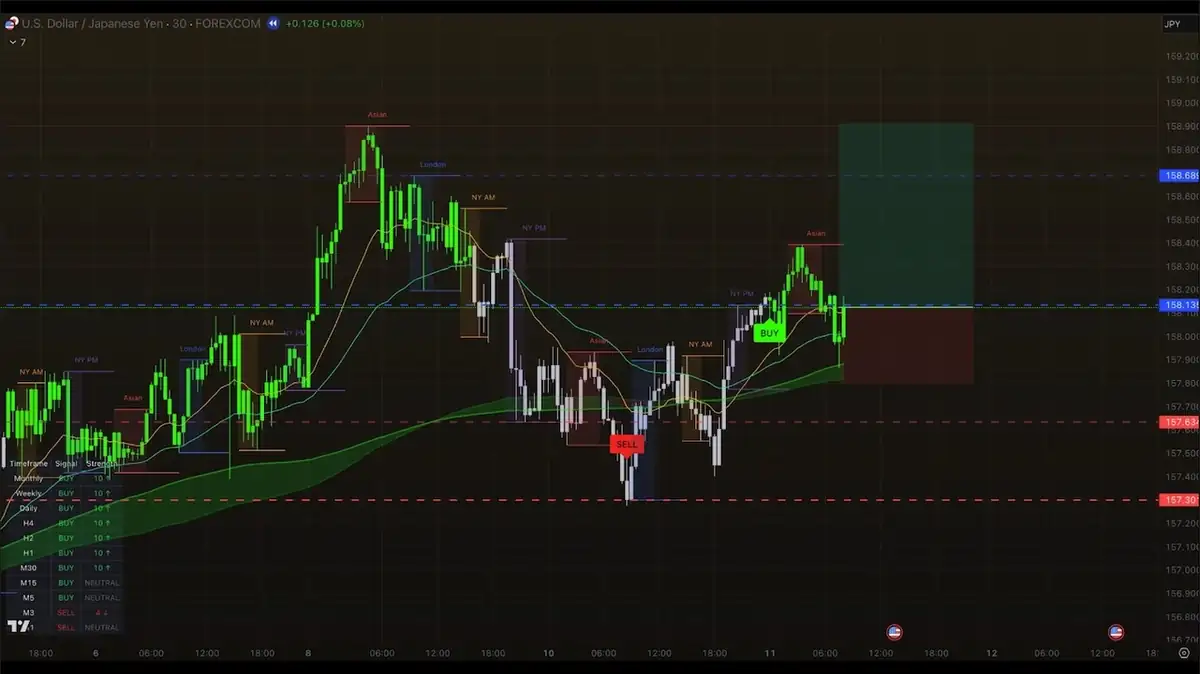
One System. Three Jobs.
Each part of PipTrend answers one question: where is the trend, where do you enter, and when do you exit?
Smart Signal Engine
BUY and SELL signals with color-coded candles show the trend at a glance. Every signal is confirmed on candle close and never moves, disappears, or changes.
Session Liquidity & Key Levels
Session highs and lows, VWAP, supply and demand zones, fair value gaps and proven support and resistance, painted on your chart so entries start from tested locations.
Multi-Timeframe Table
Trend alignment across 12 timeframes, from 1-Minute to Monthly, so you can see when to hold longer and when to take profit.
Everything About PipTrend
Features
The signal engine, multi-timeframe table, alerts and key levels, and what each does.
Open FeaturesHow It Works
From checkout to PipTrend on your TradingView chart in under 5 minutes.
Open How It WorksLive Results
Documented trades, each with the chart setup and the broker result side by side.
Open Live ResultsPricing
Monthly, quarterly and yearly plans, each starting with a 3-day free trial.
Open PricingPipTrend at a Glance
- Platform
- TradingView, including the free plan
- Markets
- Forex, Crypto, Indices, Commodities, Stocks
- Timeframes
- 12, from 1-Minute to Monthly
- Signals
- Non-repainting, confirmed on candle close
- Alerts
- Push notification, email, or desktop
- Access
- Invite-only TradingView script, activated after checkout via Whop
- Free trial
- 3 days on every plan
PipTrend Indicator FAQ
What is the PipTrend indicator? expand_more
Does the indicator repaint? expand_more
Does it work on the free TradingView plan? expand_more
What markets and timeframes does it support? expand_more
How do I get access after I subscribe? expand_more
Is there a free trial? expand_more
Put PipTrend On Your Chart
Join 100+ traders who stopped guessing and started following a system. Direction, entry, and exit, all in one place.
Secure checkout via Whop · Instant access · 30-day money-back guarantee
