Best indicator combinations for TradingView in 2026
On this page
Introduction
Most traders don’t have an indicator problem.
They have a combination problem.
Five oscillators, three moving averages, and a stack of signals that disagree with each other on every candle.
This guide is for retail traders who know the basics but keep running into cluttered charts, conflicting signals, late entries, and second-guessing. If you’ve ever watched RSI say “oversold” while MACD says “keep falling,” you know the feeling.
We evaluated the best indicator combinations using a role-based framework.
Every tool on a chart should have one job.
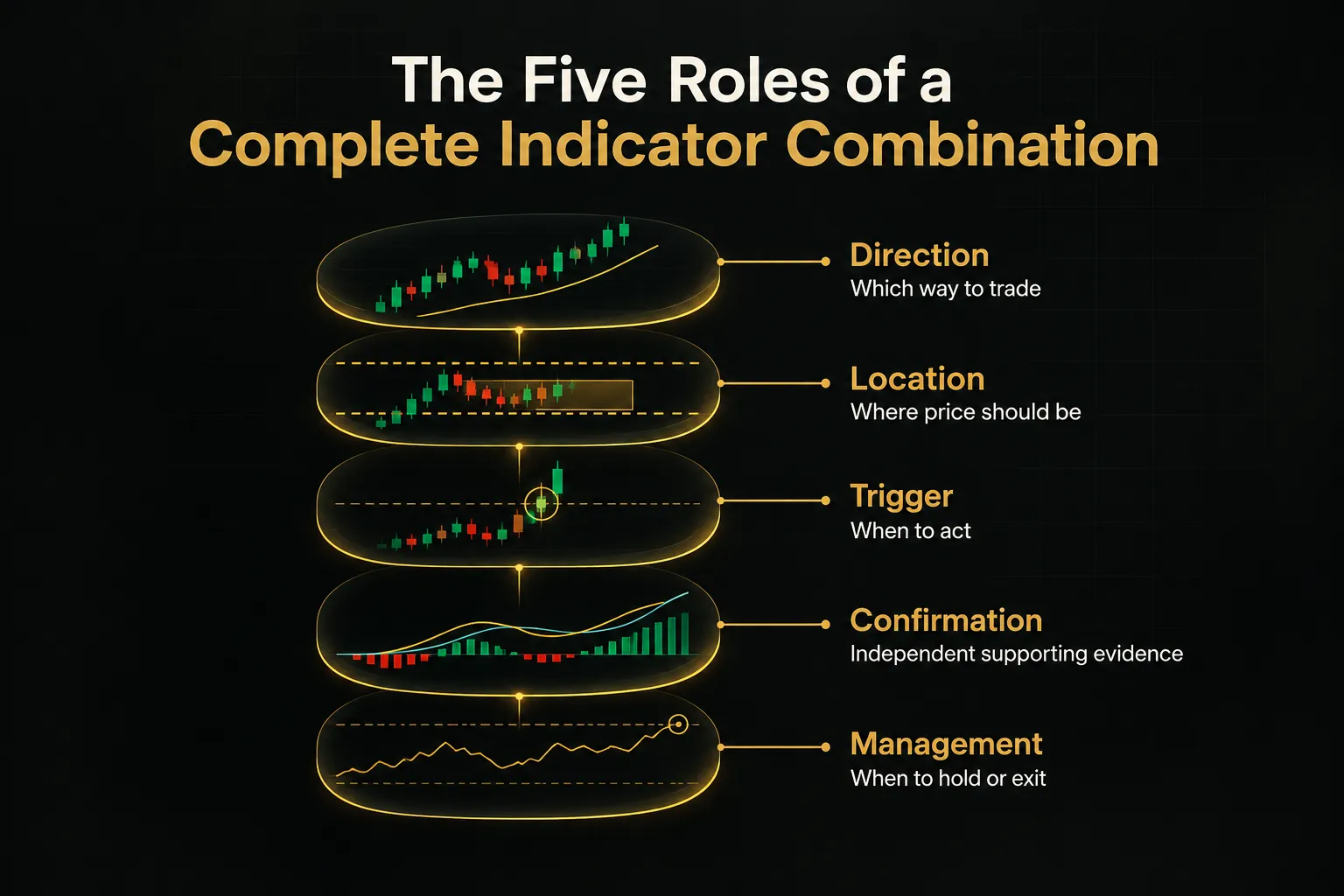
The five roles that matter are:
- Direction: which way you should be trading right now.
- Location: the specific price level where a trade makes sense.
- Trigger: the event that tells you to act.
- Confirmation: independent evidence that supports the setup.
- Trade management: when to hold, when to scale, and when to exit.
This framework also exposes a common trap.
Real indicator confluence means two tools measuring different things (say, trend direction and a liquidity level) agreeing on the same trade.
Stacking RSI, Stochastic, and CCI isn’t confluence. It’s the same momentum reading three times, dressed up as confirmation.
Our top pick for 2026 is PipTrend, a unified system that separates the direction signal from the entry level and adds a 12-timeframe table for trade management. It’s also one of the few suites that publishes its trade outcomes, losses included, with verified cTrader statements.
Quick picks: best indicator combinations at a glance
Short on time?
This table summarizes every suite we reviewed, with updated pricing for 2026. Impatient readers can jump straight to a pick from here and skip the deep dives.
| Name | Best for | Standout role | Starting price | Repaint / candle-close status | Our rating |
|---|---|---|---|---|---|
| PipTrend | Best overall | Direction + entry + trade management in one system | $40/mo (yearly, $479.99 billed) | Confirms on candle close, no repainting | 4.9/5 |
| LuxAlgo | Advanced ecosystem and order flow | Direction + confirmation (broad library) | Free tier; paid from $39.99/mo (annual) | Not prominently stated | 4.6/5 |
| ChartPrime | Bundled education and community | Entry signals with TP/SL | From ~$40/mo (Pro, billed yearly) | Not prominently stated | 4.4/5 |
| Zeiierman | Large indicator library | Market structure + confirmation | From $37.99/mo (annual) | Not prominently stated | 4.4/5 |
| Market Cipher | Crypto wave and momentum trading | Momentum confirmation | $1,000/yr listed (often ~$600) | Not prominently stated | 4.0/5 |
| SMRT Algo | Budget lifetime access | Entry + screening | $795 lifetime (promo $238.50) | Marketed as no-repaint | 4.1/5 |
| AlgoAlpha | ML-style signals and automation | Trigger + backtesting | From $28.72/mo (annual) | Not prominently stated | 4.3/5 |
| EXCAVO | Liquidity sweeps and smart money | Location + confirmation | From $49/mo (PULSE) | Not prominently stated | 4.1/5 |
A note on the repaint column.
“Not prominently stated” doesn’t mean a suite repaints. It means we couldn’t confirm candle-close behavior from public materials, so you should verify it yourself during a trial.
PipTrend: best overall indicator system for direction, entry, and exit
PipTrend is the best indicator combination for most TradingView traders in 2026 because it fills every role in the framework with a tool built for that one job. Most suites hand you a pile of indicators and leave the assembly to you.
PipTrend ships the assembled version.
The core design principle is simple.
The signal shows direction only.
Color-coded candles paint green for bullish momentum, red for bearish pressure, and gray while a trend is still forming, with a whipsaw filter that keeps you out of choppy conditions.
The entry comes from a marked price level instead: session highs and lows, previous day high and low, VWAP, supply and demand zones with mitigation tracking, and a fair value gap indicator.
That separation is what stops traders from buying the top the second a BUY prints.
A dynamic Confidence Band also marks pullback zones, acting as support in uptrends and resistance in downtrends.
Trade management is handled by the multi-timeframe confirmation table, which shows BUY, SELL, or NEUTRAL status across 12 timeframes, from 1-minute to Monthly. When the higher timeframes stay aligned, you hold.
When they flip, you take profit.
Pricing is straightforward.
Monthly is $59.99/mo, Quarterly is $45/mo ($134.99 billed every 3 months), and Yearly is $40/mo ($479.99 billed once). Every plan includes all indicators, real-time alerts, all markets, the Whop community, and future updates, plus a 3-day free trial and a 30-day money-back guarantee.
Best for: day traders, swing traders, long-term investors, and prop firm challenge traders who want a repeatable, rules-based process across Forex, Crypto, Indices, Commodities, and Stocks.
The honest drawback?
The multi-timeframe table and companion tools take a short learning curve to read correctly.
And it’s a recurring subscription, not a one-off purchase, though the 18 free companion tools (position size, risk-reward, and expectancy calculators among them) add real risk management value.
Why it wins: signals confirm on candle close and never repaint, and trade ideas are published on a public results page with verified cTrader statements, losses and break-evens included. Not a highlight reel.
LuxAlgo: best for a broad ecosystem with order-flow and AI tools
LuxAlgo is the deepest toolbox on this list. If you want order-flow data, screeners, AI-assisted research, and a huge indicator library under one login, nothing else matches its breadth.
The flagship tools are Signals & Overlays, Price Action Concepts, and the Oscillator Matrix, which together cover trend, market structure indicators, and momentum confirmation. Premium plans add live CME futures data, 90 days of order-flow lookback, and webhook automation. Higher tiers bring Quant AI and coding features with larger usage quotas.
Pricing scales quickly.
There’s a free tier, then paid plans from $39.99/mo for Premium on annual billing, rising to $59.99/mo for Ultimate and $119.99/mo for AI Ultra. Monthly billing runs from $67.99 to $229.99, and promotional checkout pricing may differ.
Best for: advanced traders who want depth and are comfortable learning many separate tools rather than following one unified workflow. If you enjoy building and tuning your own system, LuxAlgo gives you the parts.
But breadth cuts both ways.
The large feature set increases decision fatigue, and it’s easy to end up with three tools answering the same question. The top tiers are expensive compared with simpler combinations, and there’s no public ledger of live trade outcomes to judge real-world results against.
Verdict: excellent for researchers and tinkerers.
Overkill for traders who just want a clear direction, a clear entry, and a clear exit.
ChartPrime: best for bundled education and community signals
ChartPrime pairs its indicators with ongoing education, which makes it a strong choice for traders who learn best alongside other people.
The indicator suite is only half the product.
The core tools include Market Oracle, the ChartPrime Oscillator, a Pattern Detection Algorithm, and Peak Seeker. Members also get real-time signals with take-profit and stop-loss levels, a private Discord, and weekly strategy sessions. The Plus tier adds two extra indicators, more than 12 additional features, custom-signal creation, and weekly TA Plus classes.
Pricing: Pro is $67/mo or $489 billed yearly (about $40/mo). Plus is $117/mo or $708 billed yearly (about $59/mo). A 20% promo code was displayed on the site at research time.
Best for: traders who want structured education and a private community alongside their best TradingView indicators. If live sessions keep you accountable, this setup has real value.
The drawback is evidence.
ChartPrime leans more on community commentary than independently verified results, so you’re trusting the room rather than a published ledger. And the two-tier structure can make it unclear which features you actually need before you pay.
Verdict: a solid learning environment.
Less ideal if you want a self-contained, rules-based system you can run without daily community input.
Zeiierman: best for traders who want a large indicator catalog
Zeiierman offers one of the largest premium catalogs available on TradingView. More than 80 premium indicators, nine advanced buy/sell algorithms, two bots, strategies, and VIP Discord access.
The standout is the Smart Money Concept toolkit, which maps break of structure (BOS), change of character (CHoCH), premium and discount zones, liquidity zones, fractals, and predicted structure. Categories also span trend, momentum, volume and volatility, supply and demand, reversal, and risk management.
Pricing: $95.20 monthly, with discounted effective rates of $59.99/mo quarterly ($179.96 per quarter) and $37.99/mo annually ($455.82 per year). A lifetime plan costs $1,999.
Best for: experienced traders who enjoy building a custom toolkit from a large library and already know which roles they need to fill. If you have a defined strategy and want specialized tools to express it, the catalog delivers.
The weakness is the flip side of the strength.
With 80+ tools and no role-based framework guiding the build, it’s very easy to stack redundant momentum indicators and mistake agreement for confluence. Expect a steep learning curve just deciding what to load.
Verdict: great value per indicator on the annual plan.
Only worth it if you have the discipline to use five tools out of eighty.
Market Cipher: best for crypto-focused wave and momentum trading
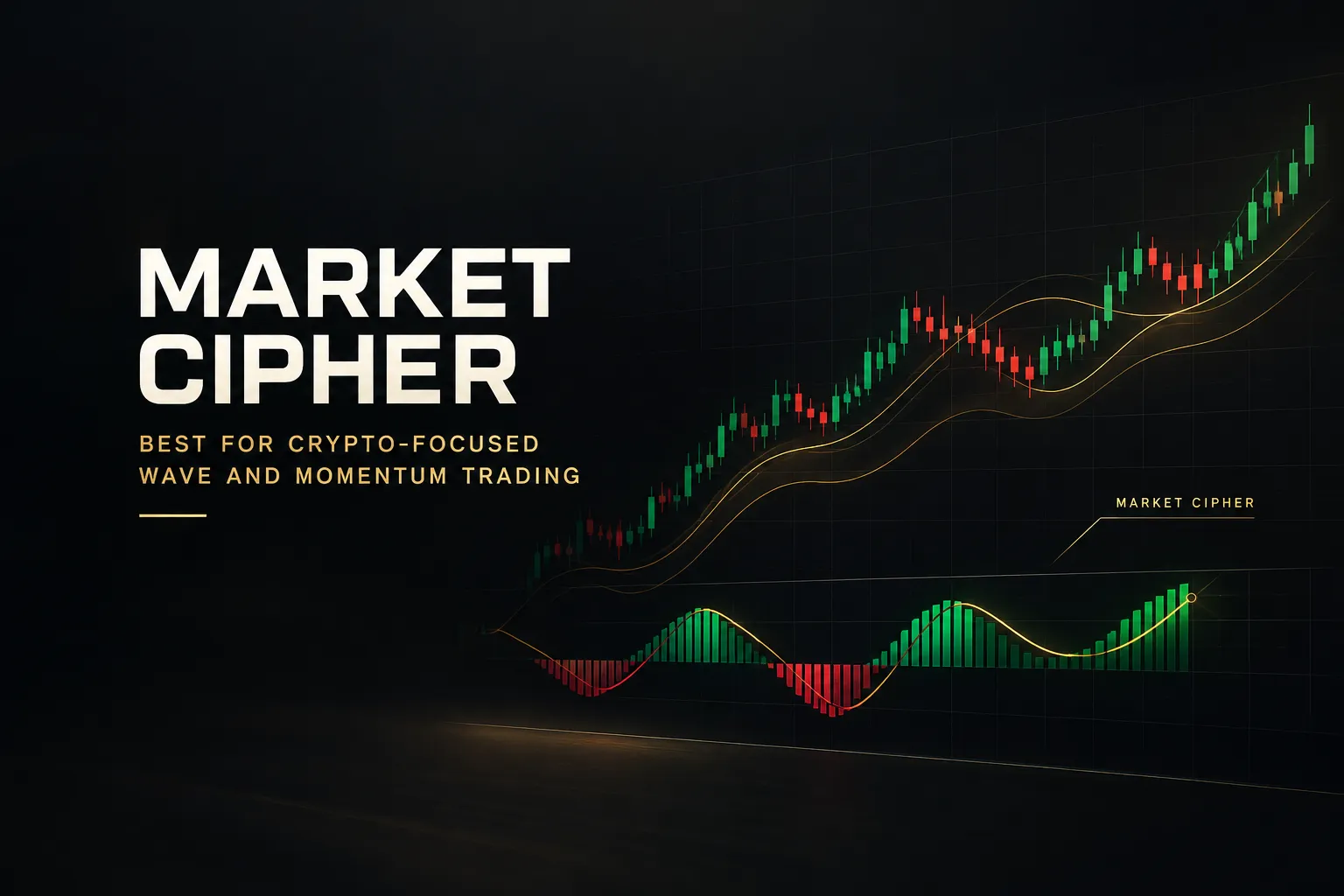
Market Cipher is one of the most recognizable names in crypto charting, and its suite is built around a tightly integrated wave and momentum workflow.
The package includes Market Cipher A, Market Cipher B, Market Cipher SR, and Market Cipher DBSI. Together they combine wave structure, momentum timing, and support/resistance refinement. Members get 24-hour support and Discord access, and the company frames the suite as general market commentary rather than personalized advice.
Pricing is the steepest upfront commitment here.
The 12-month subscription is listed at $1,000 (shown at ~$600 on sale at research time), and lifetime access is listed at $3,000 (shown at ~$1,500). Enterprise pricing is custom.
Best for: crypto traders who want a long-established brand, a familiar visual language that other traders recognize, and Discord support.
The drawbacks are significant for anyone outside crypto.
The upfront cost is very high, the crypto-centric framing limits multi-asset use, and public performance evidence is less transparent than a published results page.
You pay a premium for the brand… without a verified track record to show for it.
Verdict: a recognizable crypto toolkit.
Hard to justify for forex, indices, or stock traders.
SMRT Algo: best budget lifetime option for a large tool library
SMRT Algo offers the lowest lifetime entry price for a big toolkit. At promo pricing, you can own 14 Pro indicators for less than a year of most subscriptions.
The library includes Pro V5, the Smart Money Toolkit, SMRT Oscillator, Volume Profile, a Multi-Asset Screener, SMRT MACD, Scalper Strategy, Reversal Finder, and MTF Supply & Demand. The tools are marketed as non-repainting trading indicators, with configurable timeframes and multi-timeframe agreement features.
Pricing: $97 monthly after a $29.10 first month, $497 annually after a $149.10 first year, and $795 lifetime, shown at a promotional $238.50 at research time. Lifetime members also get future indicator access.
Best for: budget-conscious traders who want many tools for a low one-time entry price and don’t mind assembling their own workflow.
Watch the renewals.
Promotional pricing can obscure the true ongoing cost, since monthly jumps from $29.10 to $97 after the first month. And 14 separate tools without a clear role assignment can push you toward over-analysis rather than cleaner decisions.
Verdict: strong value at the lifetime promo.
Less compelling at full renewal price.
AlgoAlpha: best for automation and no-code backtesting
AlgoAlpha is the best pick if you want to test and automate your logic. Its no-code Strategy Builder makes indicator backtesting accessible to traders who don’t write Pine Script.
The Smart Signals Assistant offers trend, reversal, and scalping modes with five confluence modules, auto TP/SL, and alert building. ILPAC maps liquidity zones, market structure shifts, order blocks, and fair value gaps. The Strategy Builder supports AND/OR logic, leverage simulation, P&L reporting, and optional automation through supported exchanges.
Pricing on annual billing: Indicators from $28.72/mo ($344.64 upfront), Signals from $64.37/mo ($772.44 upfront), and the VIP Bundle from $79.32/mo ($951.84 upfront). Monthly and quarterly rates vary by plan and promotion.
Best for: traders who want to automate execution or validate a combination before risking money, especially in crypto markets.
The catch is focus.
AlgoAlpha’s signal and automation products lean heavily toward crypto and exchange integrations, so forex and stock traders may pay for features they’ll never touch. Plan tiers also add complexity.
Verdict: the cheapest entry point on this list and a genuine standout for backtesting.
Best value for crypto-first traders.
EXCAVO: best for liquidity-sweep and smart-money confirmation
EXCAVO is a specialist tool for smart-money traders. If liquidity sweeps are the core of your strategy, it’s built for exactly that.
The PRO plan includes 13 indicators, led by Liquidity Sweep PRO, Confluence Engine PRO, and Structural Flow PRO, alongside Supply & Demand Zones PRO, Daily Volume Profile PRO, and Adaptive SuperTrend PRO. Members get Telegram alerts, backtest results, and performance summaries.
Pricing: PRO is $79/mo.
PULSE is $49/mo and adds complete trade setups, entry points, setup history, and forward tracking. STOCKS is sold separately, and subscriptions run through the TradingView Marketplace.
Best for: traders focused specifically on liquidity sweeps and institutional-style market structure who want Telegram-based real-time trading alerts.
The drawbacks: a higher monthly cost for a narrower use case, and the site states that sales are final.
With no refund flexibility, you can’t easily back out if the approach doesn’t fit your style.
Verdict: a sharp tool for one strategy.
Not a complete system for traders who need direction, entry, and exit covered.
How to choose: matching a combination to your trading style
The right indicator combination depends on your holding period first and your feature wishlist second. A scalper and a long-term investor need completely different tools, even on the same instrument.
Day traders and scalpers should prioritize candle-close confirmation, session and VWAP entry levels, and low chart clutter. On a 1-minute to 15-minute chart, a repainting signal or a crowded screen costs you real money. VWAP and volume indicators, plus session highs and lows, give you objective intraday levels to trade from.
Swing traders should prioritize multi-timeframe analysis over intraday liquidity levels. Reading direction from H8 and Daily charts, then confirming alignment before entering, filters out most low-quality setups.
Long-term investors need weekly and monthly trend color-coding far more than tick-level entries. A clean higher-timeframe trend read helps you time entries into major moves without overtrading.
Prop firm challenge traders have the strictest requirement of all.
Fixed, repeatable rules (direction, entry, exit) matter far more than feature count, because one impulsive trade can blow a drawdown limit.
Can you write your rules on an index card?
If not, your combination is too complicated.
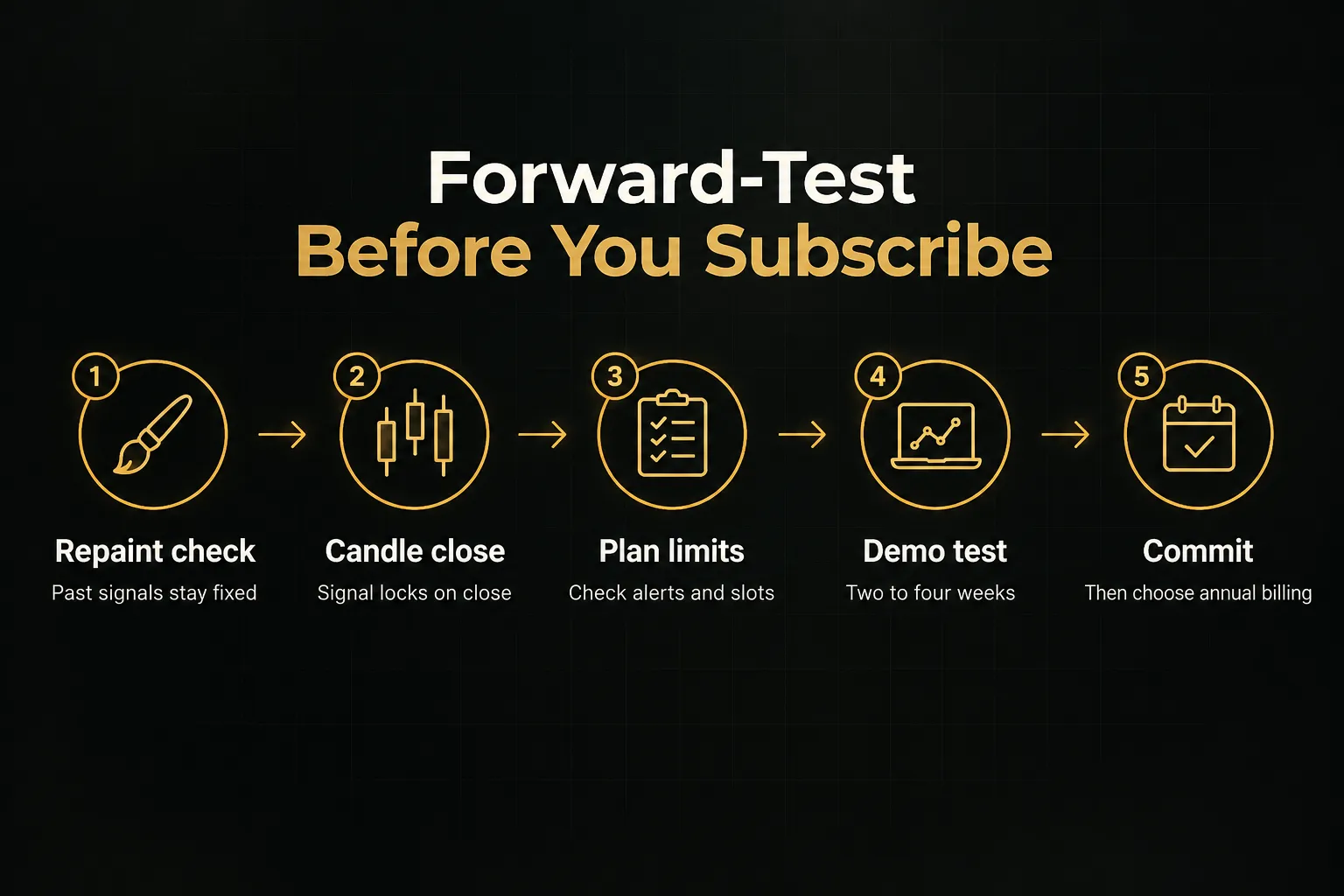
Before subscribing to anything, run a forward test:
- Confirm no repainting. Watch live signals and check whether past ones change after the fact.
- Verify candle-close behavior. A signal should stay fixed once the candle closes.
- Check your TradingView plan limits. Alert counts and indicator slots vary by plan, and some suites need several slots.
- Test for 2-4 weeks on a demo or small position size before committing to annual billing.
This is where total cost of ownership matters more than sticker price.
A cheap suite you abandon after two months costs more than a system you actually use.
Verdict: pick PipTrend if you want one unified system with published, verified results. Pick a library suite like LuxAlgo or Zeiierman if you want to build your own combination from many tools.
FAQ
What is the most accurate combination of trading indicators?
The most accurate combination pairs tools that measure different things: a trend filter for direction, a price level for entry, and a multi-timeframe check for management.
No indicator combination is accurate on its own, because accuracy comes from non-overlapping roles.
PipTrend is built this way, and it publishes real outcomes so you can judge accuracy directly.
What are the best 3 indicators to use together?
Use one trend indicator, one location tool, and one momentum or timeframe confirmation. A common example is a 200-period moving average for direction, VWAP or supply and demand zones for entry, and RSI for momentum.
Avoid picking three oscillators, since they’ll mostly repeat each other.
Which indicator combination is best for intraday trading?
For intraday trading, combine a non-repainting trend signal with VWAP and session highs and lows. Those levels are where intraday liquidity sits, so they give you objective entries instead of chasing candles.
Add session killzones (London and New York) to focus on the hours with the most volume.
Is RSI or MACD better for confirmation?
RSI is better for spotting overextension, while MACD is better for confirming trend momentum and crossovers.
Pick one, not both, because they’re both momentum tools and largely redundant together.
In a MACD and moving average strategy, MACD confirms what the moving average already shows, so pair it with a price level instead.
What indicators should I combine with a moving average?
Combine a moving average with a location tool and one momentum reading.
A moving average RSI strategy works well when you add supply and demand zones or VWAP for precise entries. The moving average sets direction, the level sets location, and RSI confirms the move has strength behind it.
How many indicators should I use on TradingView?
Use three to five indicators, one per role, and no more.
Each tool should answer a different question: direction, location, trigger, confirmation, or management.
If two indicators answer the same question, remove one.
Fewer, clearer tools beat a crowded chart every time.
Risk Disclaimer: Trading involves risk. Past performance doesn't guarantee future results. Only trade with money you can afford to lose. PipTrend is a tool to assist your trading decisions, not financial advice.