Best TradingView indicators for beginners in 2026
On this page
Best TradingView indicators for beginners in 2026
This guide is for traders who can already read a candlestick chart but keep hitting the same wall.
Too many lines on the chart.
Signals that contradict each other, and buy and sell arrows that never explain where to actually enter.
Most TradingView indicator reviews focus on what an indicator calculates.
We took a different approach.
Each option was judged on six things a beginner actually needs: direction, entry location, confirmation, alerts, exits, and risk management.
The options fall into three groups.
Free TradingView indicators are the built-in tools every account gets, such as the moving average, exponential moving average, relative strength index, MACD, Bollinger Bands, and VWAP.
Paid TradingView indicators come either as standalone scripts that do one job or as all-in-one systems that bundle signals, levels, and confirmation into a single workflow.
Why does that distinction matter?
Because a single momentum indicator can tell you a market is strong, but it can’t tell you where to enter or when to leave.
Beginners usually fail in the gap between those questions.
Our top pick is PipTrend.
It earns the spot because it isn’t another isolated tool.
It’s a complete, repeatable process that covers direction, entry, and exits in one system, which is exactly what a struggling beginner is missing.
Every product below also gets an honest “best for” recommendation, including lower-cost and free alternatives. Some readers will be better served by a cheaper plan or the built-in tools, and we say so.
Quick picks: best TradingView indicators for beginners at a glance
Here’s how the eight options compare on the details that matter most before you sign up. Pricing reflects published rates as of 2026, and promotional offers change often, so confirm the final figure at checkout.
| Name | Best for | Starting price | Free trial/refund policy | Markets supported | Repainting/confirmation notes |
|---|---|---|---|---|---|
| PipTrend (Best Overall) | Complete beginner workflow: direction, entry, and exits | $40/mo billed yearly ($479.99); $59.99/mo monthly | 3-day free trial + 30-day money-back guarantee on all plans | Forex, Crypto, Indices, Commodities, Stocks | Signals confirm on candle close; whipsaw filter; public verified cTrader results |
| LuxAlgo | Broad professional toolkit as you grow | Free plan; Premium $39.99/mo billed annually | Free plan available | TradingView-supported markets plus Vela platform | Invite-only flagship toolkits; verify behavior on a live chart |
| Flux Charts | Learning smart money concepts | ~$59.99/mo billed annually; ~$119.99/mo monthly | 30-day refund reported on first monthly payment only | TradingView-supported markets | Invite-only scripts; verify confirmation rules before trading |
| ChartPrime | Visual buy/sell signals and overlays | Pro ~$40/mo billed annually ($489/yr) | 7-day risk-free trial reported | TradingView-supported markets | Many overlays; confirm which tool governs each decision |
| SMRT Algo | Budget all-in-one alternative | $29.10 first month, then $97/mo | Promotional pricing; check renewal terms | TradingView-supported markets | No-repaint positioning claimed |
| AlgoAlpha | Lowest-cost paid entry plan | ~$28.72/mo billed annually | Free TradingView indicator library to sample first | TradingView-supported markets | Multi-timeframe confirmation in Momentum Concepts |
| Zeiierman Trading | Large indicator library to explore | $37.99/mo billed annually | Free companion indicators available | Stocks, Forex, Crypto, Commodities, Indices | 80+ indicators; test each script individually |
| BigBeluga | All-in-one ecosystem with AI assistance | $66.47/mo monthly; $468.96/yr | Discount codes often promoted; verify terms | TradingView-supported markets | Built-in backtester; forward test before trusting results |
The table gives you the shape of each option. The full write-ups below cover the drawbacks, pricing caveats, and the specific trader each tool suits best.
PipTrend: Best overall for a complete beginner trading workflow
PipTrend is the best TradingView indicator system for beginners in 2026 because it fixes the mistake that costs new traders the most: treating a signal as an entry.
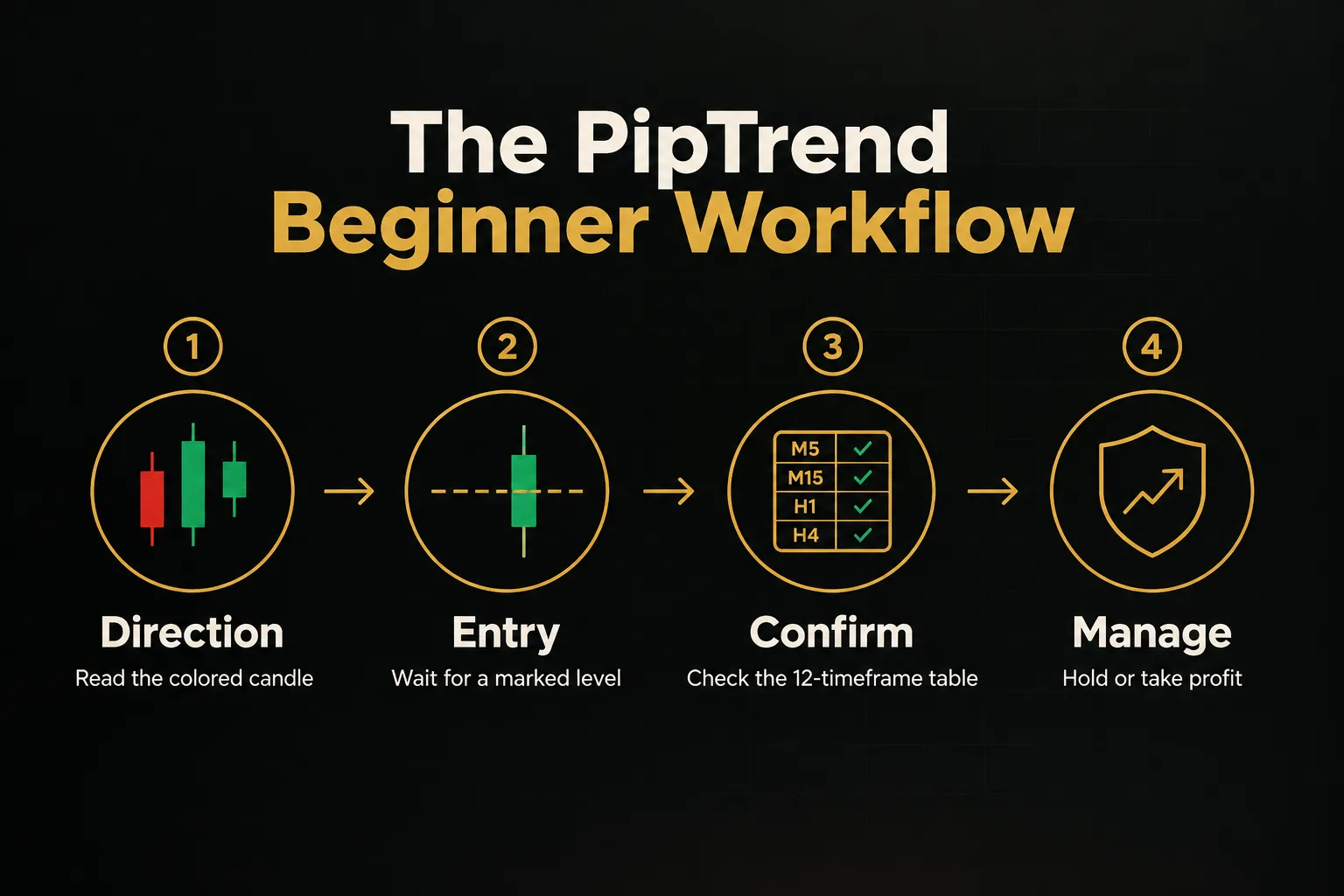
The signal gives direction only.
The entry comes from a marked price level.
Direction comes from color-coded signal candles: green for bullish momentum, red for bearish pressure, and gray while a trend is still forming.
Entries come from precision levels painted on the chart, including session highs and lows, previous day high and low, VWAP, supply and demand zones with mitigation tracking, and fair value gaps.
That separation is what stops beginners from buying tops and selling bottoms the moment an arrow appears.
Then there’s the multi-timeframe confirmation table.
One dashboard shows BUY, SELL, or NEUTRAL status across 12 timeframes, from 1-minute to Monthly.
Should you hold, take profit, or skip the trade entirely?
The table answers that instead of your nerves.
Repainting is the most common beginner complaint about buy and sell signals, and PipTrend addresses it directly.
Signals confirm on candle close, so once a candle closes, the printed signal does not change.
A built-in whipsaw filter also keeps you out of choppy, low-probability conditions.
Transparency is the second big differentiator.
PipTrend publishes trade ideas taken with the indicator on a public results page with verified cTrader statements, losses and break-evens included.
Most competitors show backtests and cherry-picked screenshots instead.
Beyond the core engine, every plan includes the Confidence Band for pullback entries, automatic session killzones (Asian, London, New York AM and PM), and real-time push, email, and desktop TradingView alerts. You also get 18 free companion tools, including position size, risk-reward, pip value, and trade expectancy calculators, plus a currency strength meter and economic calendar.
Best for: day traders using session liquidity and VWAP on 1 to 15-minute charts, swing traders reading H8 and Daily direction, long-term investors timing Weekly and Monthly trends, and prop-firm challenge traders who need fixed rules to stay inside drawdown limits. It covers Forex, Crypto, Indices, Commodities, and Stocks.
Honest drawback: it’s a paid subscription. If you only want to tinker casually with indicators, the free built-in tools are a smaller commitment.
PipTrend pricing tiers explained
PipTrend offers three plans, and every one includes all indicators, real-time alerts, all markets, community access, and every future update.
- Monthly: $59.99/mo, billed monthly. The most flexible option for testing the system over a few weeks.
- Quarterly: $45/mo, billed as $134.99 every 3 months. Saves $180 per year versus monthly.
- Yearly: $40/mo, billed as $479.99 once per year. Saves $240 per year versus monthly, and the best value for committed traders.
All plans come with a 3-day free trial and a 30-day money-back guarantee. PipTrend has announced these rates will rise (monthly to $83.99/mo, quarterly to $63/mo, yearly to $56/mo), so current pricing is worth locking in if the trial convinces you.
Checkout runs through Whop and accepts major cards and PayPal.
LuxAlgo: Best for a broad professional toolkit as you grow past beginner basics
LuxAlgo is the strongest choice for traders who have outgrown a single setup and want a professional-grade toolbox. Its range is wide: Signals & Overlays, Price Action Concepts, the Oscillator Matrix, orderflow tools, and its own Vela charting platform with an indicator library.
The automation side is a real strength.
Strategy alerts with webhook automation, indicator backtesting, and Quant AI coding features give intermediate traders room to test and automate ideas without building everything from scratch.
Pricing is tiered.
There’s a free plan, then Premium from $39.99/mo billed annually ($67.99 monthly), Ultimate from $59.99/mo annually ($119.99 monthly), and AI Ultra from $119.99/mo annually ($229.99 monthly).
Promotional pricing may differ, so check the current offer.
Best for: traders ready to graduate from a simple trend-and-momentum approach into automation, backtesting, and orderflow analysis. If you already know your style and want deeper tools to refine it, LuxAlgo fits well.
Honest drawback: breadth works against absolute beginners. Four tiers and a long list of toolkits can overwhelm someone who just wants one narrow, clearly defined workflow.
Access adds another layer.
LuxAlgo’s flagship toolkits require TradingView invite-only access, so there’s an onboarding step before anything appears on your chart.
And once it does, there’s a learning curve.
Each toolkit has its own settings and logic, and a beginner needs time to understand which component is producing which signal.
That’s manageable for an intermediate trader, but slower for someone in their first few months.
Flux Charts: Best for learning smart money concepts as a beginner
Flux Charts is the best pick for beginners specifically drawn to smart money concepts (SMC) and ICT-style trading. Its core is the SFX Algo, which provides directional and volatility signals, paired with a Price Action Toolkit.
The structure tools are the main draw.
Multi-timeframe supply and demand zones, order blocks, liquidity, market structure, and fair value gaps all appear directly on the chart.
Asset screeners and strategy backtesters round out the package.
Pricing is reported at approximately $59.99/mo equivalent billed annually, or around $119.99/mo billed monthly. A 30-day refund is reported for the first monthly payment only, so verify refund terms at checkout before choosing an annual plan.
Best for: beginners committed to the SMC framework who are willing to invest real time in education. The Discord community and live classes are useful here, because the concepts take study to apply well.
Honest drawback: the terminology load is heavy. Order blocks, liquidity sweeps, and market structure shifts require more upfront learning than a basic moving average or momentum indicator setup.
That’s not a flaw in the product.
It’s a trade-off in the methodology.
A trader who wants simple trend direction plus a clear entry level will reach a usable process faster with a narrower tool.
Access is also invite-only.
Like LuxAlgo, Flux Charts delivers its scripts through invite-only TradingView access, which adds one more onboarding step for new users before they can start forward testing.
ChartPrime: Best for visual buy/sell signals and chart overlays
ChartPrime is the best fit for beginners who think visually and want clear buy and sell markers on the chart. The Market Oracle provides directional signals, backed by Prime Oscillators and a Pattern Detection Algorithm for visual confirmation.
The supporting toolset is large.
Peak Seeker, Market Dynamics and liquidity tools, fair value gaps, order blocks, Volume Profile, and support and resistance levels are all included, along with a Discord community, live sessions, and optional automation.
Pricing has two main tiers.
Pro is displayed at $67/mo or $489 billed annually (about $40/mo).
Plus is $117/mo or $708 billed annually (about $59/mo).
A 7-day risk-free trial is reported, and promotional codes may be available.
Best for: beginners who like clear on-chart signals and are comfortable spending time learning which tool governs which decision. If seeing a marker on the candle builds your confidence, ChartPrime delivers that.
Honest drawback: clutter. Stack fair value gaps, order blocks, volume profile, and oscillators together and the chart quickly becomes the exact mess most beginners are trying to escape.
The fix is discipline.
Pick one signal tool and one confirmation tool, then hide the rest until you understand them.
Feature gating is the other consideration.
Screeners and custom signals sit behind the higher-priced tiers, so the Pro plan won’t unlock everything.
Map out which features you actually need before choosing between Pro and Plus.
SMRT Algo: Best budget all-in-one alternative for beginners

SMRT Algo is the best budget all-in-one option for beginners who want a full suite without paying for several subscriptions. The bundle includes the Smart Money Toolkit (order blocks, fair value gaps, break-of-structure tools), the SMRT Oscillator, Volume Profile, and multi-timeframe supply and demand.
You also get multiple algo versions (Pro V5, Pro V4, Pro V3, and V1), a multi-asset screener, SMRT MACD, swing and scalping strategies, a Reversal Finder, and a Trend Pivot Oscillator. SMRT Algo advertises no-repaint positioning and offers Discord support.
The pricing is where you need to slow down.
The site displays a promotional first month at $29.10, then $97/mo, or an annual first year at $149.10, then $497/yr.
A lifetime promotion around $238.50 has also been shown.
Best for: cost-conscious beginners who want signals, structure, volume, and alerts in one package. If budget is the deciding factor and you want an all-in-one feel, it’s a sensible place to start.
Honest drawback: the promotional pricing is complex, and renewal rates jump sharply.
A $29.10 first month becomes $97 the next… so calculate your true year-two cost before committing.
Other SMRT Algo pages have shown different temporary offers, which makes comparison harder. Check the renewal price in writing at checkout.
The second risk is self-inflicted.
With 14 tools included, it’s tempting to switch them all on at once, which recreates the clutter problem an all-in-one suite is supposed to solve.
Start with one algo and one confirmation tool.
AlgoAlpha: Best low-cost entry plan for new traders
AlgoAlpha offers the lowest-cost paid entry point on this list. The headline tool is the Smart Signals Assistant, which runs in trend, reversal, and scalping modes with five confluence modules behind it.
The no-code Strategy Builder stands out for beginners. It lets you test trading ideas without writing Pine Script, and Atlas AI adds strategy research and backtesting on higher plans.
Other modules include Institutional Liquidity and Price Action Concepts, liquidity heatmaps, market-structure shifts, order blocks, fair value gaps, and Momentum Concepts with divergence and multi-timeframe confirmation. Screeners can monitor up to 18 assets.
Pricing as of 2026: the Indicators plan starts at roughly $28.72/mo equivalent billed annually ($344.64 for the first year).
The Signals plan runs about $64.37/mo, and the VIP Bundle about $79.32/mo, both annual equivalents.
Monthly and quarterly prices vary.
Best for: beginners who want to start cheap and add screeners and AI-assisted backtesting later.
It scales with you.
Honest drawback: it isn’t plug-and-play. The AI, liquidity, and momentum modules all need disciplined configuration, and a new trader can easily overcomplicate the chart.
That makes AlgoAlpha a tool-first product rather than a single prescribed workflow. You’ll need to decide yourself which module handles direction and which handles entries.
One genuine advantage: AlgoAlpha maintains a free TradingView indicator library. Sampling those scripts is a low-risk way to see whether the brand’s style suits you before upgrading.
Zeiierman Trading: Best for traders who want a large indicator library to explore
Zeiierman Trading is the pick for traders who want maximum variety. The library includes over 80 premium TradingView indicators and nine advanced buy/sell algorithms covering breakout, reversal, trend, momentum, and supply and demand styles.
Smart money concepts, liquidity signals, bots, backtested strategies, and risk-management tools are also part of the package. It works across stocks, forex, crypto, commodities, and indices.
Pricing is straightforward: $37.99/mo billed annually, $59.99/mo billed quarterly, or $95.20/mo month to month. Lifetime access is also promoted, but the current one-time price should be verified at checkout.
Best for: traders who enjoy experimenting across many indicator types before settling on a personal style. If you like testing a volatility indicator one week and a trend-following indicator the next, the library gives you plenty to work with.
Honest drawback: dozens of indicators and strategies is the opposite of what most beginners need. A new trader benefits from one clearly prescribed setup, and a huge menu can slow decision-making rather than speed it up.
Choice paralysis is real.
Testing 80 tools properly takes months of forward testing, and switching systems every few weeks makes it impossible to judge whether any of them work.
Zeiierman does soften the learning curve.
Discord VIP access plus free companion indicators and educational materials help beginners get oriented before committing to specific premium scripts.
BigBeluga: Best for an all-in-one ecosystem with AI assistance
BigBeluga is the most ecosystem-style option on the list, built around AI assistance and a large bundle of toolkits. The core includes Market Core and Waves Toolkits, a Smart Money Toolkit, the Sonar AI assistant, and a built-in backtester.
Supporting tools include the Nautilus Pro Oscillator, Ultimate MACD Suite, and Ultimate RSI Suite. Lifetime plans add Strategy Builder Pro and the Market Echo Screener, plus premium Discord and Telegram communities.
Official pricing lists $66.47/mo monthly, $149.01 quarterly, $468.96 billed annually, and $1,999 lifetime. Discount codes are often promoted, so the final checkout price may differ.
Best for: beginners who want a broad tool ecosystem plus community education and are comfortable working across multiple suites. The AI assistant can help answer questions as you learn.
Honest drawback: most beginners need one trend tool, one confirmation tool, and a basic risk-management process. A MACD suite, an RSI suite, screeners, and an AI assistant may be far more than that.
The lifetime plan also deserves caution.
$1,999 upfront is a meaningful commitment compared to testing a smaller toolkit month to month, especially before you know which trading style suits you.
Which TradingView indicator setup should you actually choose
The right TradingView indicator setup depends on how you trade. Here’s the short version by trader profile.
- Day traders need precise intraday levels. Session liquidity highs and lows plus VWAP on 1 to 15-minute charts, which is exactly what PipTrend paints automatically.
- Swing traders benefit most from multi-timeframe analysis, confirming that H8 and Daily direction agree before entering.
- Long-term investors are best served by higher-timeframe color-coded trend tools on Weekly and Monthly charts.
- Prop-firm challenge traders need fixed, repeatable rules that keep them inside drawdown limits.
Whichever profile fits, remember this: a buy/sell signal is not the same as a precise entry location.
A signal tells you which way to lean.
It doesn’t tell you where price is likely to give you a good fill.
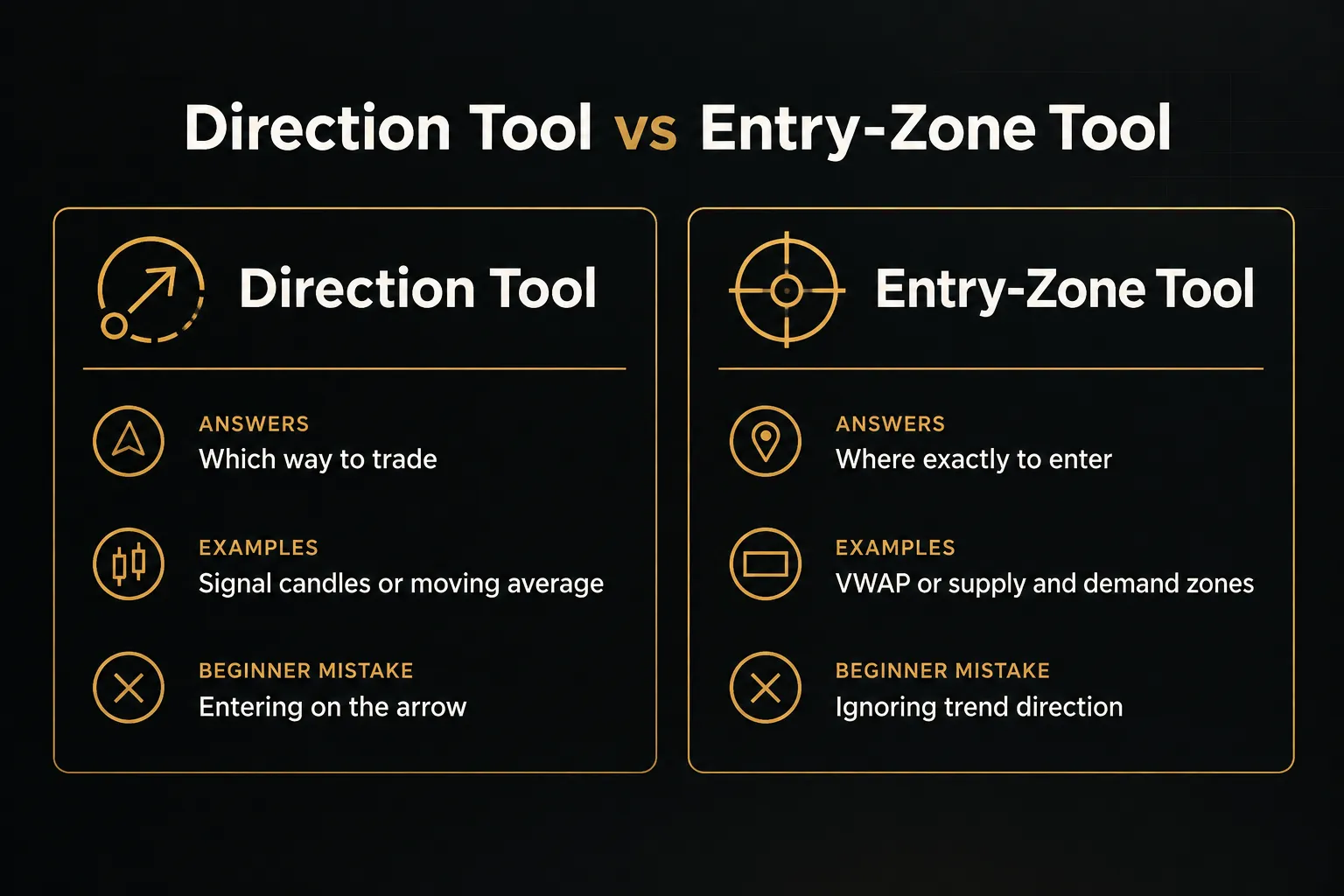
Beginners need both.
Without an entry-zone tool, traders chase signals and enter late.
Without a direction tool, they buy support in a downtrend.
Start cheap and prove the process.
Use TradingView’s built-in free tools (an exponential moving average, RSI, and VWAP make a reasonable starter set) or a free trial before paying for an annual plan.
Paper trading for a few weeks costs nothing and reveals a lot.
Before trusting any paid suite, verify three things:
- Candle-close confirmation. Does the signal lock once the candle closes, or can it shift afterward?
- Repainting behavior. Watch the indicator on a live chart for several sessions and compare what you saw in real time with what the history shows.
- Public, verified records. Backtests are easy to curve-fit. Real trade outcomes, losses included, are much harder to fake.
Our verdict: for beginners who want one coherent system covering direction, entry, and exits, PipTrend is the clear choice. It replaces a stack of single-purpose tools with a single repeatable process, backed by publicly verified results and a 30-day money-back guarantee.
One final reminder.
No indicator replaces risk management for beginners: sensible position sizing, a stop-loss on every trade, and the discipline to follow your rules after a losing streak.
Frequently asked questions
What is the best indicator for beginners on TradingView?
PipTrend is the best TradingView indicator for beginners in 2026 because it combines direction, entry levels, and multi-timeframe confirmation in one system. Its signals confirm on candle close, and its results are published with verified cTrader statements.
If you want a free starting point instead, a 50-period exponential moving average on TradingView is the simplest trend-following indicator to learn.
What are the top 3 indicators every beginner trader should use?
Use one trend tool, one momentum tool, and one location tool. A good free combination is an exponential moving average for direction, the relative strength index for momentum, and VWAP or support and resistance for entry location.
That trio covers the core questions.
PipTrend bundles the same logic (direction, entry levels, and confirmation) into a single setup so the tools don’t contradict each other.
Is RSI or MACD better for beginners?
RSI is usually better for beginners.
It’s a single line on a 0 to 100 scale, so overbought and oversold readings are easy to spot.
MACD combines two moving averages, a signal line, and a histogram, which takes longer to read correctly.
Both are momentum indicators, though.
Neither tells you where to enter, so pair either one with a trend and entry-level tool.
What is the most accurate buy and sell indicator on TradingView?
Choose a non-repainting indicator with candle-close confirmation and publicly verified results. No indicator is accurate in isolation, and any product claiming a fixed win rate deserves skepticism.
PipTrend meets all three criteria: signals lock on candle close, a whipsaw filter reduces false signals in choppy markets, and outcomes (losses included) are published on a public results page.
Can beginners make money using TradingView indicators?
Yes, but only when indicators sit inside a disciplined process.
Indicators improve consistency by giving you fixed rules for entries and exits.
They don’t remove risk.
Profitability comes from combining a tested system with position sizing, stop-losses, and enough forward testing to trust your rules. Paper trade first, then risk small amounts.
Are paid TradingView indicators worth it?
Paid indicators are worth it when they replace guesswork with a complete, verifiable workflow. They’re not worth it if they just add more lines to an already cluttered chart.
Start with a free trial or money-back guarantee so you can test on a live chart. PipTrend’s 3-day free trial and 30-day money-back guarantee make it a low-risk way to find out whether a full system suits your trading.
Risk Disclaimer: Trading involves risk. Past performance doesn't guarantee future results. Only trade with money you can afford to lose. PipTrend is a tool to assist your trading decisions, not financial advice.