On this page
Introduction
This guide is for retail day traders deciding between two paths. You can build your own exponential moving average setup (9/21, 20/50, or 12/26), or you can use a complete TradingView indicator system that handles more of the work for you.
We evaluated every option against the same six criteria: responsiveness versus lag, false-signal rate, entry precision, multi-timeframe confirmation, alert quality, and how transparent each provider is about real results. Free settings and paid systems were judged by the same standards.
Here’s the problem most guides skip.
EMA length is not the same as chart timeframe. A 21-period EMA on a 5-minute chart covers about 105 minutes of price data. A 21-period EMA on a daily chart covers roughly a month.
Same number, completely different indicator.
That confusion explains why so many traders copy “the best EMA settings” from a forum post and then wonder why the signals feel random.
The setting was never the issue.
The context was.
And even with the right length, an EMA crossover strategy only tells you direction. It doesn’t tell you where to enter or when to exit.
That gap is where most losing trades come from.
Our top pick for 2026 is PipTrend, a TradingView system that separates direction, entry, and exit into three dedicated tools. It suits traders who want a repeatable process rather than a judgment call on every candle.
But it isn’t the only answer.
We also cover the classic DIY crossovers honestly (they’re free and work well in the right conditions) and five competing indicator platforms, each with a genuine niche.
Quick picks: best EMA settings and systems compared
Short on time?
This table summarizes every option reviewed below. Pricing is updated for 2026, and ratings reflect our editorial scoring across the six evaluation criteria.
| Name | Best for | EMA / indicator approach | Price | Our rating |
|---|---|---|---|---|
| PipTrend | Best overall: complete direction, entry, and exit workflow | Smart signal engine with color-coded candles, Confidence Band, VWAP and session levels, 12-timeframe confirmation table | $59.99/mo, $45/mo quarterly, $40/mo yearly; 3-day free trial | 9.5/10 |
| 9/21 EMA crossover | Fast scalping on 1-minute and 5-minute charts | Fast EMA and slow EMA crossover | Free | 7.5/10 |
| 20/50 EMA combination | Intraday trend-following on 15-minute and 1-hour charts | Slower moving average crossover with less noise | Free | 7.5/10 |
| LuxAlgo (Vela) | Advanced traders wanting a full TA platform | 800+ tools, order flow, quant coding agent | Free plan; $24.99 to $119.99/mo (annual) | 8.5/10 |
| Flux Charts | Configurable algo signals by trading style | Adjustable trend length and sensitivity, Scalper/Day/Swing modes | ~$59.99/mo billed annually ($719.88/yr) | 8.0/10 |
| ChartPrime | Visual toolkit with market structure and SMC | Market Dynamics and Market Oracle signals | $40 to $117/mo depending on plan and billing | 8.0/10 |
| Zeiierman Trading | Large indicator library, liquidity signals, bots | Nine buy/sell algorithms, 80+ premium indicators | $37.99 to $95.20/mo; $1,999 lifetime | 7.5/10 |
| AlgoXpert | Session-based auction theory and M5 entries | Auction Map, session VWAP, 35-check Confluence Core | $79/mo, $66/mo quarterly, $58/mo yearly | 8.0/10 |
The short version: if you want a free starting point, use 9/21 for scalping or 20/50 for intraday trend-following. If you want direction, entry, and exit handled together across multiple markets, PipTrend is the most complete option for the price.
PipTrend: Best complete EMA-based system for direction, entry, and exit confirmation
PipTrend is the best overall choice for day traders who want a full process, not just a line on a chart. Its core idea is simple: the signal gives direction, and the entry comes from a marked price level.
That separation is what a plain EMA crossover is missing.
Direction comes from the smart signal engine, which paints color-coded candles directly on your chart: green for bullish momentum, red for bearish pressure, and gray while a trend is still forming. A built-in whipsaw filter keeps you out of the choppy conditions that wreck basic crossovers.
Entries come from levels, not impulses.
PipTrend plots VWAP, session highs and lows, previous day high and low, supply and demand zones with mitigation tracking, and fair value gaps. The Confidence Band works like a dynamic EMA support and resistance zone, showing where to look for pullback entries.
Then there’s the multi-timeframe table.
It shows BUY, SELL, or NEUTRAL status across 12 timeframes, from 1-minute to Monthly. That solves the single-timeframe blind spot of every DIY setup, and it tells you when to hold a position or take profit.
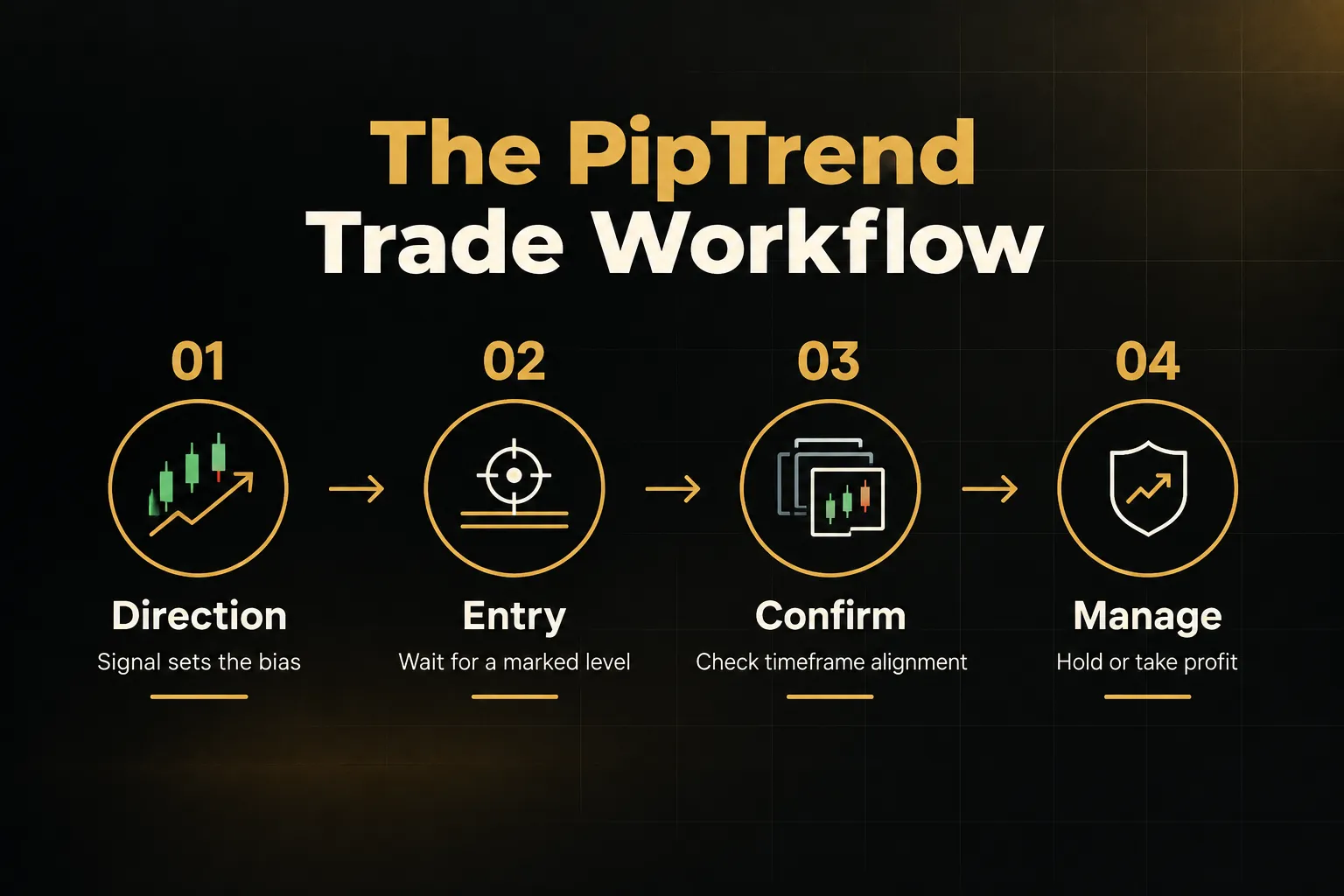
Pricing (as of 2026): $59.99/mo billed monthly, $45/mo quarterly ($134.99 every 3 months), or $40/mo yearly ($479.99/yr). Every plan includes all indicators, real-time alerts, all markets, community access, and future updates, plus a 3-day free trial and a 30-day money-back guarantee.
Current rates are scheduled to increase, so locking in now saves money.
Best for: day traders working 1-minute to 15-minute charts, swing traders reading H8 and Daily direction, prop-firm challenge traders who need fixed rules to stay inside drawdown limits, and long-term investors timing entries with Weekly and Monthly candles.
The honest drawback: it’s more involved than a bare crossover, and it costs money. If you just want one free line on one chart, this isn’t for you.
But transparency sets it apart.
PipTrend publishes trade ideas on a public results page with verified cTrader statements, losses and break-evens included. Most competitors show backtests.
That’s a real difference.
Verdict: The most complete EMA trend indicator system we tested. Direction, entry, and exit in one subscription, with real results to back it up.
9 and 21 EMA crossover: Best for fast scalping on 1-minute and 5-minute charts
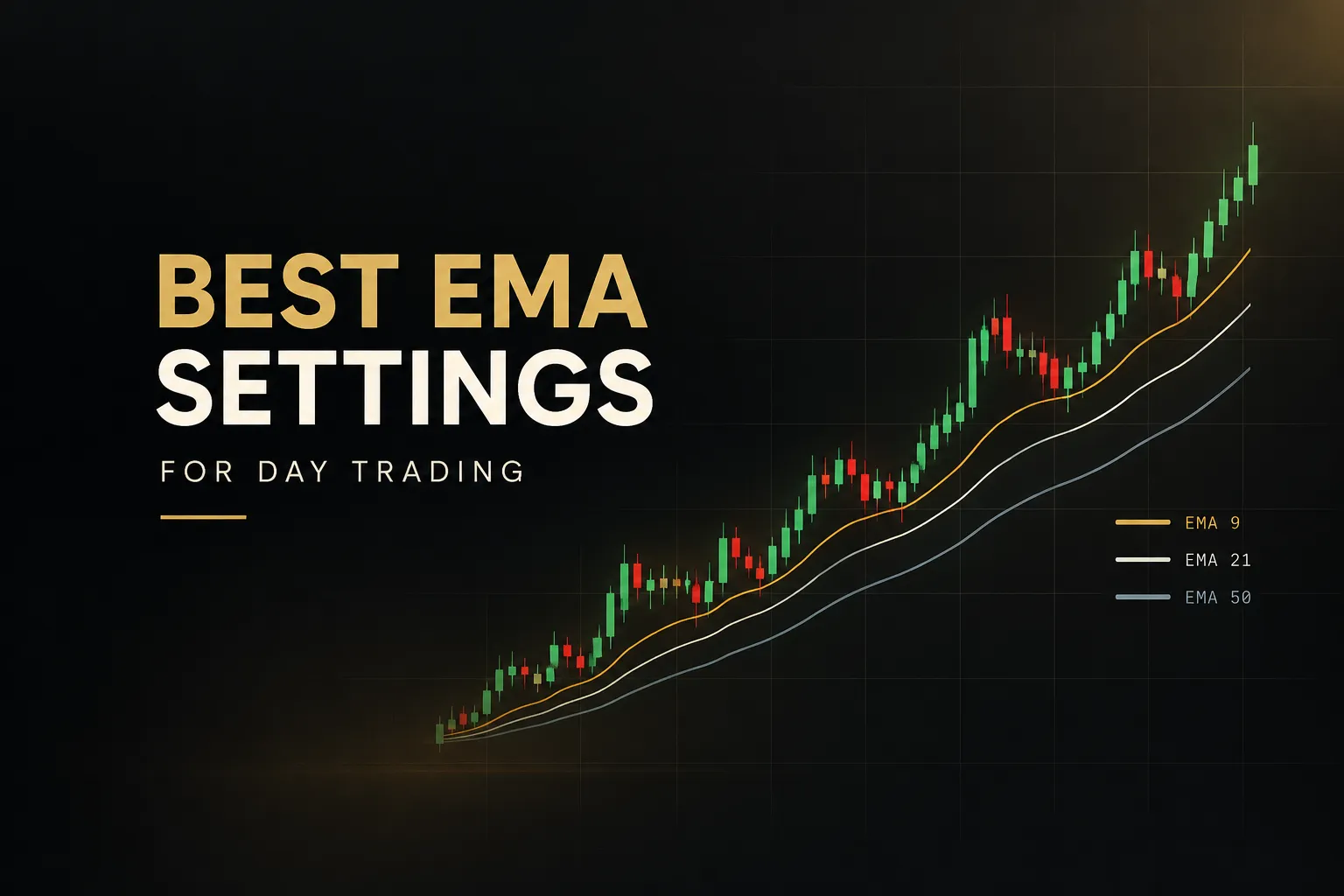
The 9/21 EMA crossover is the fastest free setup worth using. The 9-period fast EMA reacts quickly to momentum shifts, while the 21-period slow EMA confirms that the shift has some staying power.
Scalpers love it for that reason.
Pricing: free.
You can build it in seconds with the default TradingView EMA indicator or any charting platform’s moving average tool.
Best for: scalpers and very short-term day traders on 1-minute and 5-minute charts, especially in liquid, trending conditions like the London and New York opens.
Now the confusion we mentioned earlier.
A 21 EMA on a 5-minute chart reflects roughly the last 105 minutes of trading. A 21-day EMA on a daily chart reflects about a month. When someone says “the 21 EMA works,” ask which chart.
The answer changes everything.
The honest drawback: this pair whipsaws badly in choppy or low-volume sessions. Lunchtime in US stocks or the quiet Asian session in EUR/USD can produce cross after cross with no follow-through.
It also gives you no entry price and no exit logic. Treat every cross as a trade, and you’ll often end up buying straight into resistance or selling into support… right before price reverses.
Verdict: Great for speed. Poor on its own. Pair it with a marked level before acting on any cross.
20 and 50 EMA combination: Best for intraday trend-following on 15-minute and 1-hour charts
The 20/50 EMA pair is the best free choice for traders who hold positions for hours, not minutes. It’s smoother and slower than 9/21, which filters out minor noise and gives a cleaner read on the intraday trend.
Pricing: free, available on any charting software that lets you customize EMA lengths.
Best for: day traders using 15-minute to 1-hour charts on stocks, indices like NAS100 and US30, or forex majors, who want to ride a session trend rather than scalp every wiggle.
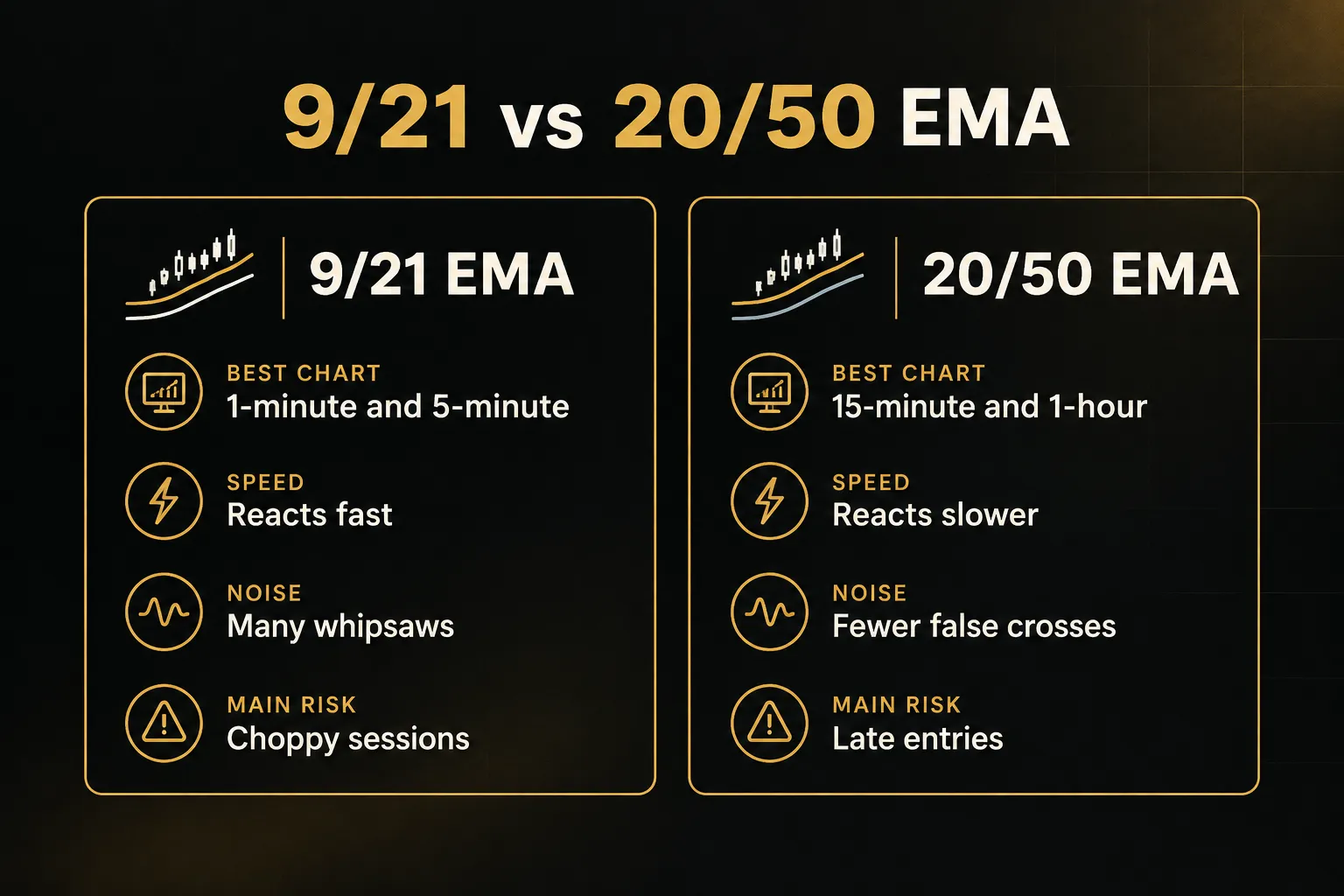
The honest drawback: lag.
By the time the 20 crosses the 50, a meaningful part of the move has often already happened. You’re confirming the trend, not catching it.
And like every crossover, it offers no stop-loss or take-profit logic. You still need to decide where to get out.
The fix is to stop trading the cross in isolation.
Use the 20/50 for intraday trend confirmation, then wait for price to pull back to VWAP or a session level before entering. That EMA pullback strategy turns a late signal into a better-priced entry.
Verdict: Reliable trend filter. Weak entry trigger. Best used with VWAP or session highs and lows.
LuxAlgo (Vela): Best for advanced traders wanting a full technical-analysis platform
LuxAlgo is the best pick for advanced traders who want a broad technical-analysis platform rather than a focused EMA workflow. The LuxAlgo Library offers 800+ tools, and higher tiers add order-flow data (footprints, delta, and profiles) plus a quant coding agent for building or modifying indicators.
Core toolkits include Signals & Overlays, Price Action Concepts, and Oscillator Matrix, along with a strategy screener, strategy alerts, and webhook automation on eligible plans.
Pricing: a free plan is available.
Paid tiers run from $24.99/mo (Essential, billed annually) up to $119.99/mo (AI Ultra, billed annually), with monthly billing costing more ($39.99 to $229.99/mo). A 30-day money-back guarantee applies.
Best for: technically oriented traders who want automation, order flow, and deep customization well beyond EMA signals.
The honest drawback: the ecosystem is large and multi-tiered. Traders who just want a clear day-trading process can get lost in it, and the upper tiers cost considerably more than a dedicated system like PipTrend.
Flux Charts: Best for configurable algo signals across scalping, day trading, and swing styles
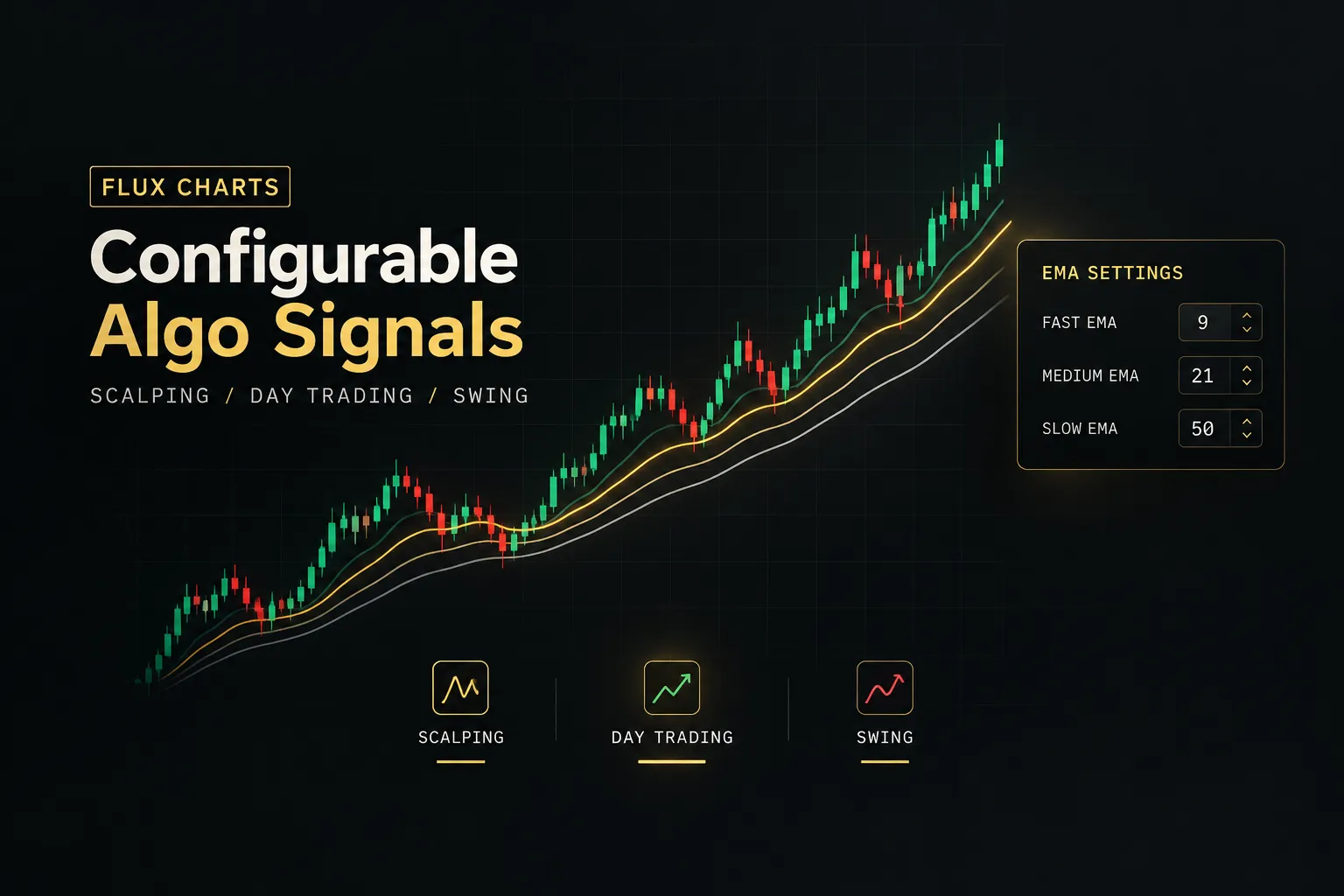
Flux Charts is the best choice for traders who want to tune signal sensitivity themselves. Its SFX Algo Toolkit offers adjustable trend length and sensitivity, plus dedicated Scalper, Day Trader, and Swing Trader modes.
Take-profit and stop-loss methods are built into the signals, and EMA alerts cover bullish, bearish, TP, SL, and re-entry events. You also get Price Action and multi-timeframe Supply & Demand toolkits, each with its own screener and backtester.
Pricing: the Pro plan is shown at around $59.99/mo billed annually ($719.88/yr).
Month-to-month pricing should be confirmed at checkout.
Best for: hands-on traders who like adjusting algorithmic settings and running built-in backtests before going live. Free TradingView indicators and a Discord community round it out.
The honest drawback: it relies on invite-only scripts, and the feature set (three toolkits, three screeners, three backtesters) is more than many traders need. If you only want a clean direction-and-entry workflow, it can feel heavy.
ChartPrime: Best for a visual toolkit with market structure and smart money concepts
ChartPrime is the best fit for traders who want a broad visual package with smart money concepts and live education. Market Dynamics maps structure, liquidity, breakouts, and reaction zones.
Market Oracle adds trend direction, reversal warnings, profit-taking cues, and trailing-stop zones.
Beyond that, you get Prime Oscillators, fair value gaps, Volume Profile, order blocks, multi-timeframe support and resistance, a screener, and real-time signals with TP and SL levels.
Pricing: Pro costs $40/mo billed annually ($489/yr) or $67/mo monthly. Plus costs $59/mo annually ($708/yr) or $117/mo monthly.
A 7-day risk-free trial is advertised.
Best for: traders who value community strategy sessions and daily market insights alongside their signals.
The honest drawback: the Plus tier gets expensive on monthly billing, and the product puts less emphasis on a tightly defined, minimal entry process than a dedicated direction-entry-exit system does.
Zeiierman Trading: Best for a large indicator library with liquidity signals and bots
Zeiierman Trading is the best option for traders who want the widest indicator library. Membership includes nine algorithmic buy/sell signals, Liquidity Signals, two automated strategy bots, an SMC indicator, and 80+ premium TradingView indicators.
Its alerts use confirmed data and are described as non-repainting trading signals. A free indicator library and VIP Discord access are also part of the package.
Pricing: $95.20/mo monthly, $59.99/mo quarterly equivalent, $37.99/mo annual equivalent, or $1,999 for lifetime access.
Best for: traders who run multiple strategies and want an active community rather than a single focused setup.
The honest drawback: the monthly price is the highest of the comparable systems here. Separate trading-signal subscriptions may also add to the total cost.
AlgoXpert: Best for session-based auction theory and a rules-based M5 entry workflow
AlgoXpert is the best choice for session traders who think in auction theory and market profile. Its Auction Map shows value areas, point of control, and low-volume zones, while session VWAP with deviation bands frames the day.
The centerpiece is Confluence Core, a 35-check entry engine built around a confirmed M5 entry orb. A Command Deck tracks structure across 10 timeframes, and alerts cover profile levels, structure shifts, and confirmed entries.
Pricing: $79/mo monthly after a 7-day free trial, $66/mo quarterly equivalent ($198 every 3 months), or $58/mo yearly equivalent ($696/yr).
It runs on the free TradingView plan.
Best for: traders who want a strict, rules-based framework built on liquidity and market profile, backed by a workflow course and playbook library.
The honest drawback: the M5-focused engine and auction-market framework are specialized. If you want one flexible system across many timeframes and markets, it’s a narrower fit.
How to choose the right EMA settings for your trading style
The best EMA settings for day trading depend on three things: your chart timeframe, your instrument, and what you pair the EMA with. Get those right and almost any sensible length works.
Get them wrong and no setting will save you.
EMA settings by chart timeframe
Use this table as a starting point. These are the most common pairings traders use, not guaranteed winners, and each should be tested on your own instrument.
| Chart timeframe | Suggested EMA settings | Typical use | Main weakness |
|---|---|---|---|
| 1-minute | 5/13 or 9/21 | Scalping momentum bursts | Heavy noise and whipsaws |
| 5-minute | 9/21 or 20/50 | Scalping or short intraday swings | Choppy mid-session periods |
| 15-minute | 20/50 | Intraday trend-following | Late entries after crosses |
| 1-hour | 50/100, or 200 EMA for trend confirmation | Session bias and multi-hour holds | Slow to react to reversals |
Remember the core rule: the period count multiplies by the candle length.
A 50 EMA on a 15-minute chart covers about 12.5 hours. On a 1-hour chart, it covers more than two trading days.
Choose the lookback that matches how long you plan to hold.
Many traders also read a higher timeframe for bias and a lower one for timing.
That’s basic multi-timeframe analysis, and it’s exactly what PipTrend’s 12-timeframe table automates.
EMA settings by market: forex, stocks, crypto, gold, and indices
The same EMA length behaves differently on different instruments. Volatility and session behavior change how often price crosses an average and how far it travels afterward.
Forex majors like EUR/USD tend to trend during the London and New York sessions and drift during the Asian session. Faster settings work at the opens, while slower settings (or no trades) suit the quiet hours.
Stocks are often most volatile in the first hour after the open.
A fast EMA can whipsaw during that opening chaos, so many traders wait for the opening range to form before trusting any cross.
Indices like NAS100 and US30 move fast and can overshoot averages sharply. Gold (XAU/USD) has wide intraday ranges, so stops based on a tight EMA distance can get clipped easily.
Crypto trades 24/7 with no session close. That makes session-based levels less defined and weekend moves less predictable, so slower EMA settings often hold up better than ultra-fast ones.
So what’s the takeaway?
Don’t copy one setting across every market.
Test it on each instrument you actually trade.
Why crossovers alone create late entries and false signals
An EMA is a lagging indicator by design. It’s built from past prices, so a crossover always confirms a move that has already started.
That creates two predictable problems.
In trends, you enter late, often after the cleanest part of the move. In ranges, the fast EMA and slow EMA cross back and forth, generating a stream of false signals.
The third problem is less obvious.
A crossover has no idea where price is relative to key levels. You can get a buy signal right under the previous day high or a sell signal sitting on top of session support… and the trade fails almost immediately.
The fix is to separate direction from entry.
Use the EMA (or a smarter EMA trend indicator) for direction. Then enter only at a marked level: VWAP, session highs and lows, a supply or demand zone, or a fair value gap.
This is why VWAP and EMA work so well together. VWAP shows the volume-weighted average price institutions track, and the EMA shows trend direction.
A pullback to VWAP in the direction of the EMA is a far more precise entry than a raw cross.
It’s also the exact design principle behind PipTrend: signal for direction, liquidity level for entry, multi-timeframe table for exits.
How to test any EMA setting without curve-fitting
Curve-fitting is the quiet killer of EMA strategies. Tweak the lengths enough on one chart and you’ll always find a “perfect” setting.
It just won’t work next month.
Avoid it with out-of-sample testing. Pick your settings on one block of data, then test them on a separate period you didn’t look at while optimizing.
Test across multiple market regimes: trending, ranging, high volatility, and low volatility.
A setting that only works in a strong trend will bleed money in a range, and you need to know that before you trade it live.
Include spreads and commissions in your results, especially on 1-minute and 5-minute charts, where costs eat a larger share of each trade. Then forward-test on a demo or small size before committing real risk.
Finally, be skeptical of anyone who shows only backtests. Live results with losses included tell you far more than a polished equity curve.
Decision summary: choose a DIY crossover (9/21 or 20/50) if you want a free, simple approach on one timeframe and one instrument. Choose a complete system like PipTrend when you need direction, entry location, and exit confirmation working together across multiple timeframes and markets.
Free crossovers are a fine starting point. But once you trade more than one market or timeframe, a structured system pays for itself in avoided late entries.
FAQ
What is the most accurate EMA for day trading?
No single EMA is the most accurate for day trading. Accuracy depends on your chart timeframe, the instrument’s volatility, and whether you confirm the EMA with a price level.
A 9 or 21 EMA is common on 1-minute to 5-minute charts, while 20 and 50 suit 15-minute charts. Any of them becomes more reliable when you enter at VWAP or a session level instead of on the signal itself.
Is 9 EMA or 20 EMA better for day trading?
Use the 9 EMA for scalping and the 20 EMA for short intraday trend-following. The 9 EMA reacts faster to momentum shifts, which helps on 1-minute and 5-minute charts.
The 20 EMA smooths out more noise, so it gives fewer false signals but reacts later. Pick based on how long you hold trades, not on which one sounds more popular.
What is the best EMA combination for a 5-minute chart?
The 9/21 EMA is the best combination for scalping on a 5-minute chart. If you hold trades for an hour or more within the session, the 20/50 combination is the better fit.
Either way, avoid trading every cross. Wait for price to pull back to a marked level, such as VWAP or the session high or low, before entering.
Do professional traders use 9 and 21 EMA?
Yes, many professional and retail traders use the 9 and 21 EMA.
But they rarely trade the crossover alone.
Most combine it with volume, market structure, or session levels to decide where to enter.
The EMA provides context.
The level provides the trade.
Which moving average is best for intraday trading?
A combination of VWAP and EMA is the strongest moving average setup for intraday trading. VWAP reflects the volume-weighted average price that institutions often track, while the EMA shows trend direction.
Trading pullbacks to VWAP in the direction of the EMA gives you both trend alignment and a precise entry. PipTrend builds this pairing in by default, alongside session levels and supply and demand zones.
Can EMA crossover make you profitable?
An EMA crossover alone rarely produces consistent profits. Lag causes late entries in trends, and ranging markets generate repeated false signals.
Profitability typically requires three additions: defined entry levels, strict risk management, and realistic out-of-sample testing. A complete system like PipTrend packages those pieces together, which is why it’s our top pick for 2026.
Risk Disclaimer: Trading involves risk. Past performance doesn't guarantee future results. Only trade with money you can afford to lose. PipTrend is a tool to assist your trading decisions, not financial advice.