On this page
Introduction
This roundup is for retail scalpers on TradingView who trade forex, crypto, indices, futures, stocks, or commodities on fast charts. If you hold positions for minutes, not days, the indicator on your chart has very little room for error.
A late entry or a repainted signal can turn a winning setup into a loss within one candle.
We judged every tool against the same seven criteria. These were signal confirmation, entry precision, multi-timeframe workflow, pricing transparency, chart clutter, repaint behavior, and real-world verified results.
A tool that prints attractive arrows but hides its losses scored lower than one that shows its full record.
One caveat before the list.
Scalping results depend heavily on execution conditions: spread, commissions, slippage, latency, and your broker’s fills.
The best scalping indicators on TradingView can sharpen your decisions, but no indicator can make up for a 2-pip spread on a 4-pip target.
Our top pick is PipTrend.
It works as a complete decision system rather than a signal-only tool. It answers three questions in one workflow: which direction to trade, where exactly to enter, and how long to hold.
The other six tools each win in a specific niche, and we say exactly where.
Pricing in this guide was last verified in 2026, and each price points to the vendor’s official pricing page. Promotional rates change often, so confirm the live number at checkout.
Quick picks: best scalping indicators at a glance
The table below summarizes each tool’s positioning, standout capability, entry price, and evidence on repainting. Use it to shortlist two or three options, then read the full reviews.
| Indicator | Best for | Standout capability | Starting price | Non-repaint evidence | Chart clutter / slot usage |
|---|---|---|---|---|---|
| PipTrend | Best overall: complete decision system | Direction signal separated from marked entry levels, plus a 12-timeframe confirmation table | $40/mo (yearly), $59.99/mo monthly | Signals confirm on candle close; public results page with verified cTrader statements, losses included | One integrated workflow: candles, levels, and MTF table designed to work together |
| LuxAlgo | Broad all-in-one ecosystem | Signals, price action concepts, screener, backtester, AI research tools | Free plan; paid from $39.99/mo | Not specified in vendor data; test on bar replay | High if stacking several toolkits; free-plan slot limits apply |
| Flux Charts | Automated price-action zones | SFX Algo, MTF supply and demand zones, FVGs, order blocks, screeners | $59.99/mo billed yearly (pricing pages conflict) | Not specified in vendor data; test on bar replay | Multiple toolkits; needs careful slot management on free plan |
| ChartPrime | Visual trend and smart-money concepts | Market Oracle trend/reversal and Market Dynamics structure tools | $40/mo billed annually (direct) | Not specified in vendor data; test on bar replay | Several separate suites (Oracle, Dynamics, Oscillators) |
| Zeiierman Trading | Large specialized library | 80+ indicators, SMC Premium, nine algorithms, two strategy bots | $37.99/mo billed annually | Vendor docs state alerts use confirmed price data | Depends on how many of the 80+ tools you load |
| Market Cipher | Crypto and momentum traders | Cipher A trend ribbon, Cipher B money-flow oscillator, SR, DBSI | $600 for 12 months | Not specified in vendor data; test on bar replay | Four-indicator suite; free plan cannot run all at once |
| AlgoXpert | Session order-flow scalping on M5 | 61 modules, volume profile, confirmed entry orb | $58/mo (yearly), $79/mo monthly | Entry orb locks on candle close; marketed as non-repainting | Lowest: everything in a single indicator slot |
Note on pricing: several vendors show promotional rates that differ from renewal pricing, and PipTrend has announced increases to its current tiers. All figures were last verified in 2026, so check the live checkout page before you subscribe.
PipTrend: best overall scalping system with direction, entry, and exit built in
PipTrend is the best scalping indicator for TradingView in 2026 for traders who want a complete, rules-based process.
Most tools answer one question.
PipTrend answers all three: direction, entry, and trade management.
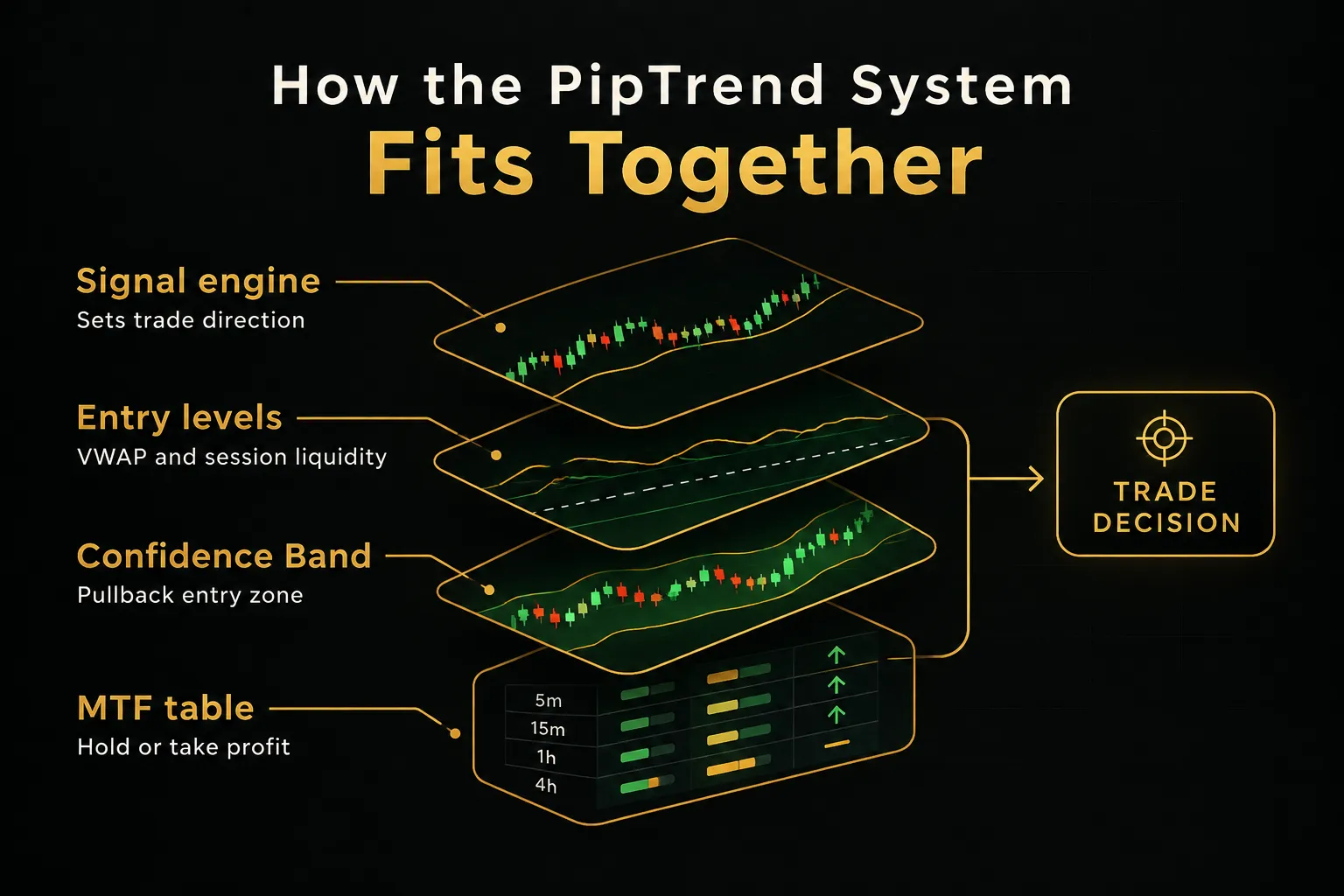
Direction comes from the smart signal engine, which paints color-coded candles directly on the chart.
Green means bullish momentum, red means bearish pressure, and gray means a trend is still forming. Those gray candles are useful for early entries, since you can position on a pullback before the move gets crowded.
But here is the core design principle.
The signal shows direction only, and the entry comes from a marked price level.
That separation stops the classic scalping mistake of buying the top the instant an arrow appears.
The entry levels include VWAP, session highs and lows, previous day high and low, supply and demand zones with mitigation tracking, and a fair value gap indicator.
A dynamic Confidence Band marks pullback zones, acting as support in uptrends and resistance in downtrends. Session killzones for Asian, London, New York AM, and New York PM are highlighted automatically and adjusted to your timezone.
Trade management comes from the multi-timeframe table.
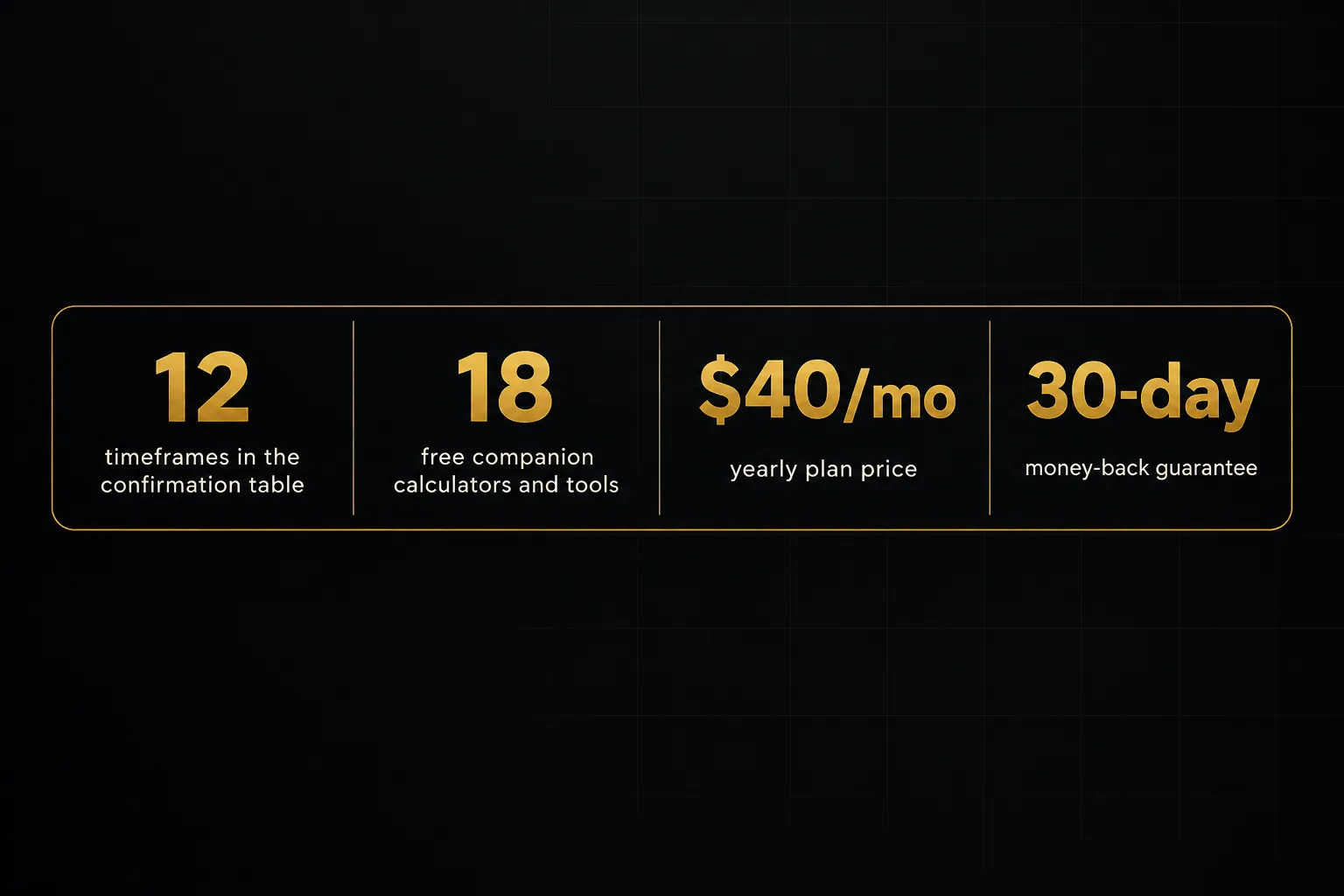
It shows BUY, SELL, or NEUTRAL across 12 timeframes, from 1-minute to Monthly.
When the higher timeframes stay aligned, you hold.
When they flip, you take profit.
On repainting, the answer is simple.
Signals confirm on candle close, and once printed they do not change. A whipsaw filter keeps you out of choppy, low-probability conditions, which matters on a 1-minute scalping indicator where noise is constant.
Transparency is the second big difference.
PipTrend publishes trade ideas taken with the indicator on a public results page, backed by verified cTrader statements.
Losses and break-evens are included.
Not a highlight reel.
Best for: day traders using session levels and VWAP on 1 to 15-minute charts, swing traders reading H8 and Daily alignment, prop-firm traders who need fixed, repeatable rules, and long-term investors timing entries with Weekly and Monthly candles. It covers forex, crypto, indices, commodities, and stocks, including EUR/USD, GBP/JPY, XAU/USD, BTC/USD, US30, and NAS100.
The honest drawback: there is a learning curve.
The full system combines a signal engine, entry levels, an MTF table, and killzones, so it takes more setup than a single plug-and-play oscillator. If you want one simple arrow and nothing else, the first few sessions will feel more involved.
As a bonus, subscribers get 18 free companion tools. These include position size, pip value, risk-reward, trade expectancy, and streak probability calculators, plus a currency strength meter, correlation matrix, and economic calendar.
Pricing tiers and guarantee
PipTrend keeps its scalping indicator pricing straightforward. Every tier includes every indicator, real-time alerts, all markets, community access, and all future updates.
- Monthly: $59.99/mo, billed monthly (scheduled to increase to $83.99/mo).
- Quarterly: $45/mo, billed as $134.99 every 3 months, saving $180/yr versus monthly.
- Yearly: $40/mo, billed as $479.99 per year, saving $240/yr versus monthly.
Every plan comes with a 3-day free trial and a 30-day money-back guarantee.
Checkout runs through Whop and accepts major cards and PayPal. TradingView alerts arrive by push, email, or desktop on any timeframe and instrument.
Verdict: If you want direction, entry, and exit in one transparent workflow, PipTrend is the most complete scalping system on TradingView. Start the 3-day trial on a live chart before committing.
LuxAlgo: best for a broad all-in-one ecosystem with screeners and backtesting
LuxAlgo is the best choice for traders who want the widest toolkit, not just a scalping setup. Its library spans signals, price action, oscillators, screening, backtesting, and AI-assisted research.
The Signals & Overlays toolkit combines signal engines, overlays, filters, metrics, a screener, and a backtester.
Price Action Concepts covers market structure, order blocks, liquidity zones, and support and resistance. The Oscillator Matrix adds momentum analysis, and newer plans include the Vela charting platform and Quant AI tools.
Pricing as of 2026: a free plan is available, then Essential at $39.99/mo ($299.88/yr), Premium at $67.99/mo ($479.88/yr), Ultimate at $119.99/mo ($719.88/yr), and AI Ultra at $229.99/mo ($1,439.88/yr).
All paid tiers carry a 30-day money-back guarantee. Promotional prices may differ from renewal pricing, so check the rate you will pay in year two.
Best for: traders who want SMC and price action analysis, indicator backtesting, and strategy automation under one subscription. If you scalp in the morning and research swing setups at night, the breadth pays off.
The honest drawback: breadth cuts both ways.
A large library can create signal overlap, cluttered charts, and decision fatigue, especially when two tools disagree on the same candle.
LuxAlgo also does not explicitly separate signal direction from a defined entry level the way a scalping-specific system does.
You get excellent components, but you assemble the workflow yourself.
Free TradingView plan users may also hit indicator-slot limits when running several LuxAlgo tools at once.
Verdict: The best ecosystem for traders who value research depth over a single, opinionated scalping process.
Flux Charts: best for automated price-action zones and screener-driven scalping
Flux Charts is the strongest option for scalpers who want price-action zones drawn automatically. It handles the tedious marking work so you can focus on reactions at the levels.
The SFX Algo Toolkit delivers signals with a matching screener.
The Multi-timeframe Supply & Demand Zones Toolkit and Price Action Toolkit mark fair value gaps, order blocks, liquidity grabs, and market structure across timeframes. Each toolkit has its own screener, so you can scan for setups instead of flipping through charts one by one.
Pricing needs a careful read.
The main pricing page shows Pro at $59.99/mo billed yearly ($719.88/yr). Another official Flux Charts page lists Premium at $67.99/mo and Pro at $119.99/mo.
That is a significant gap… so verify the exact plan and billing period at checkout before entering card details.
Best for: scalpers and day traders who trade zone reactions and want screeners to surface setups.
Higher plans add SFX, Supply & Demand, and Price Action backtesters for traders who test before going live. Educational classes, a strategy library, and community support round out the package.
The honest drawback: the pricing inconsistency makes the true cost unclear until you reach checkout. Backtesters sit behind higher-tier plans, so budget buyers lose a key validation tool.
Flux Charts works on the free TradingView plan, but only with careful slot management. Running the SFX, supply and demand, and price action toolkits together will push against the free plan’s indicator limit quickly.
Verdict: Excellent automated zone-marking. Just confirm what you are paying before you subscribe.
ChartPrime: best for visually guided trend and smart-money concepts
ChartPrime suits traders who learn visually and want community guidance alongside their signals. Its tools emphasize clean, readable trend and reversal cues.
Market Oracle handles trend and reversal detection.
Market Dynamics covers smart-money concepts, including order blocks, patterns, market structure, and multi-timeframe support and resistance. Prime Oscillators add momentum and divergence readings, and coverage extends to stocks, crypto, forex, futures, and commodities.
Pricing depends on where you buy.
Direct membership shows Pro at $40/mo billed annually ($489/yr) and Plus at $59/mo billed annually ($708/yr). A TradingView marketplace listing shows ChartPrime Plus at $117/mo.
Same product, very different price, so confirm which checkout path you are using.
Best for: traders who value weekly strategy sessions, daily market insights, and an active Discord community next to their market structure indicator. If you want someone walking you through setups each week, ChartPrime delivers that context.
The honest drawback: custom signal creation is limited to the Plus plan, so Pro users work with preset logic. The marketplace versus direct pricing gap can lead to overpaying if you buy through the wrong channel.
And there is no public, verified trade-outcome ledger.
Like most vendors in this list, ChartPrime relies on examples and tool demonstrations rather than a running record of real results, losses included.
Verdict: A friendly, visual entry point into smart-money concepts. Buy direct to get the lower rate.
Zeiierman Trading: best for traders who want a large specialized indicator library
Zeiierman Trading offers the deepest catalog of specialized tools in this roundup. It is built for traders who already know what they want to combine.
The library includes 80+ premium TradingView indicators.
The headline tool is SMC Premium, which maps market structure, fair value gaps, imbalances, order blocks, supply and demand, equal highs and lows, and points of interest. On top of that come nine buy and sell algorithms, liquidity and overbought/oversold signals, and two automated strategy bots.
Vendor documentation states that alerts use confirmed price data rather than repainting values. That is a meaningful claim for scalpers, though you should still verify it on bar replay with your own settings.
Current pricing: $95.20/mo billed monthly, $59.99/mo billed quarterly, and $37.99/mo billed annually.
The annual rate is the lowest monthly-equivalent price in this list. Older documentation references a $1,999 lifetime plan, but its current availability and terms should be confirmed directly with the vendor before purchase.
Best for: experienced traders comfortable choosing and combining tools from a large catalog, including those who want algorithmic bot signals. Predefined strategies, educational material, and a VIP Discord help shorten the learning period.
The honest drawback: 80+ indicators can overwhelm a newer scalper. Without a clear workflow tying direction, entry, and exit together, it is easy to keep swapping tools instead of building consistency.
The monthly rate is also steep.
At $95.20/mo, month-to-month users pay well over double the annual rate, so this tool rewards commitment.
Verdict: The best library for experienced traders who build their own systems. Too much choice for beginners.
Market Cipher: best for crypto and momentum traders who want a recognizable oscillator suite
Market Cipher remains a favorite among crypto and momentum traders. Its visuals are widely recognized, and its community is education-heavy.
The suite has four parts.
Market Cipher A provides trend analysis through an EMA ribbon and trend symbols.
Market Cipher B is the well-known oscillator combining momentum and money-flow concepts.
Market Cipher SR adds support and resistance plus lower-timeframe guardrails, and DBSI scores directional signals.
Pricing is upfront rather than monthly.
The 12-month Professional plan is $600 (listed down from $1,000), the Lifetime plan is $1,500 (down from $3,000), and enterprise pricing is custom. A five-month plan has appeared at $400, but it may be out of stock.
Best for: crypto and momentum-focused traders who value a long-established community, live sessions, tutorials, and a built-in risk calculator. It also works across stocks, currencies, futures, bonds, and precious metals, with TradingView alerts through indicator conditions.
The honest drawback: the upfront commitment is high compared with monthly subscriptions. You cannot test it month to month the way you can with most competitors here.
Free TradingView plan users face indicator-slot limits when running the full Cipher suite at once.
And the oscillator signal is not paired with a clearly separated entry level, so you still decide exactly where to place the order.
Verdict: A proven momentum suite for crypto traders. Expect to pay upfront and supply your own entry logic.
AlgoXpert Trading System: best for session-based order flow scalping on M5
AlgoXpert is the most focused tool in this list: a session order-flow system tuned for the 5-minute chart. If you scalp gold during London and New York, it deserves a look.
The standout is efficiency.
61 modules run inside a single TradingView indicator slot, covering volume profile, value area high and low, point of control, session profiles, untested POCs, low-volume zones, initial balance, and VWAP. Five connected engines handle the auction map, session read, point-of-interest qualification, momentum, and confirmed entries.
Each signal runs through 35 checks.
The confirmed entry orb locks on candle close and is marketed as non-repainting, which makes it a credible 5-minute scalping indicator for traders who demand confirmation.
Pricing: $79/mo monthly after a 7-day free trial, $66/mo quarterly ($198 every 3 months), and $58/mo yearly ($696/yr). Billing runs through Whop, and existing members keep their starting rate while subscribed.
Best for: session and order-flow traders focused on instruments like XAUUSD who want an M5 workflow without paying for a separate order-flow terminal or data feed. It runs on the free TradingView plan, and members get an education course, playbook library, and live webinars.
The honest drawback: it is tuned primarily for M5 session trading. That makes it less flexible across other timeframes and instruments than a multi-timeframe system like PipTrend.
The 35-check filter is a strength and a constraint. Fewer, more selective signals suit patient traders, but high-frequency scalpers may find the opportunity count too low.
Verdict: The cleanest single-slot option for M5 session scalpers. Narrow by design.
How to choose the right scalping indicator for your trading style
The right scalping indicator is the one that matches your timeframe, market, and need for structure. Start by identifying which trader profile fits you best.
- Day traders needing session liquidity levels: PipTrend (VWAP, session highs/lows, killzones) or AlgoXpert (session profiles on M5).
- Swing traders needing multi-timeframe alignment: PipTrend’s 12-timeframe table, or Flux Charts’ MTF supply and demand zones.
- Prop-firm traders needing fixed, repeatable rules: PipTrend, where signal, level, and MTF table each have one job.
- Crypto traders needing 24/7 signal reliability: PipTrend’s candle-close signals with real-time alerts, or Market Cipher for momentum reads.
- Traders wanting one clean chart with minimal slots: AlgoXpert’s single-slot design, or a single integrated suite rather than stacked toolkits.
Next, ask what the tool actually tells you. Does it give a directional signal only, or an exact entry price?
And does it address exits and trade management at all?
Many popular tools stop at the arrow, leaving the hardest decisions to you.
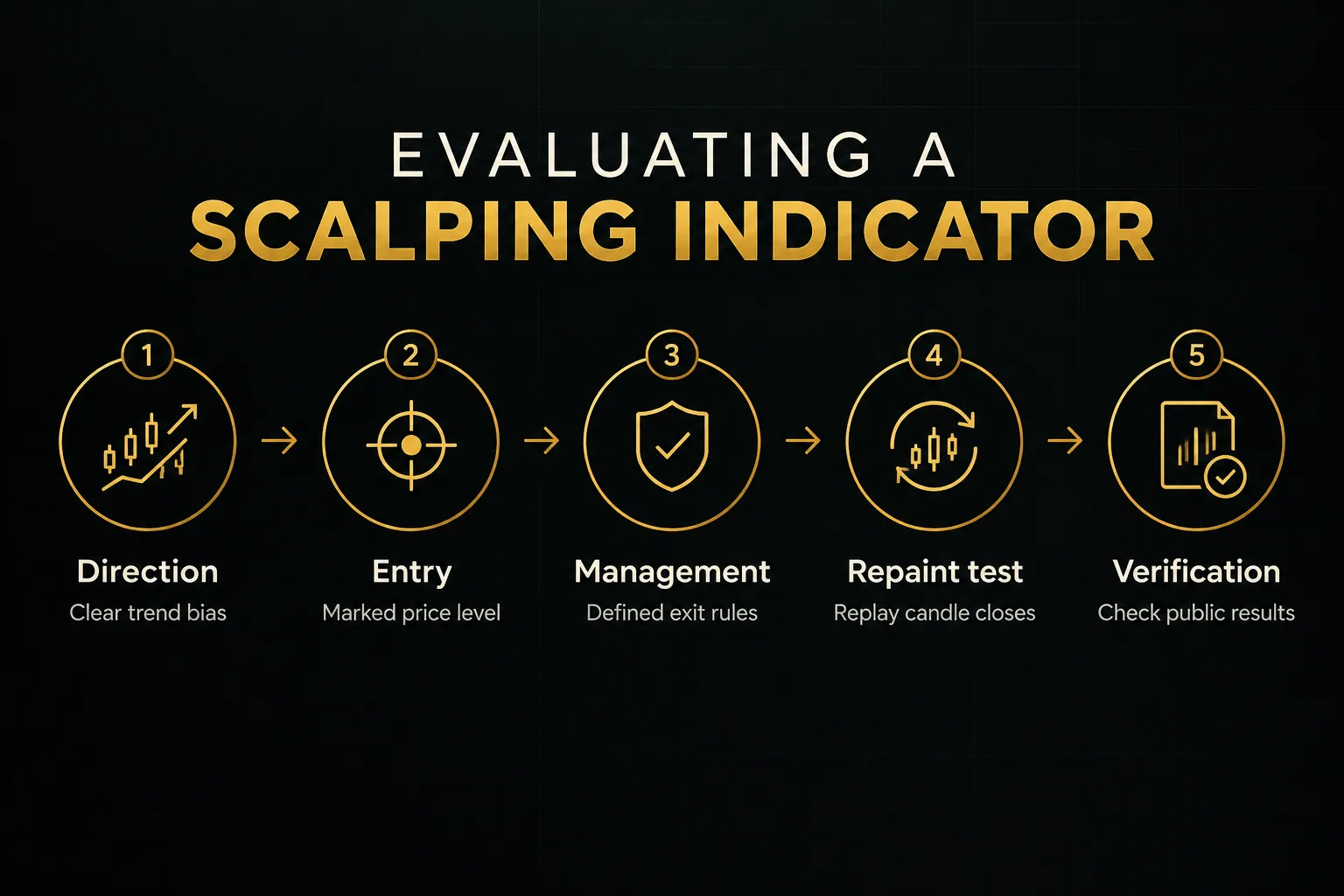
A complete TradingView scalping strategy covers three layers. Use this sequence when evaluating any tool on a demo chart:
Verify non-repaint claims yourself.
Run the indicator on TradingView’s bar replay and watch whether signals change after the candle closes. A true non-repainting indicator uses candle close confirmation, and printed signals stay put.
Then look for public, independently verifiable trade outcomes. Backtests can be curve-fitted, and screenshots can be cherry-picked.
A results page with broker statements, losses and break-evens included, tells you far more.
Remember the execution factor.
Scalping profitability depends heavily on spread, commissions, slippage, latency, and broker or exchange execution.
No indicator overrides poor execution conditions, so test your broker’s fills during the sessions you plan to trade.
Risk disclosure: paid indicators cannot guarantee profitable trading.
Scalping involves substantial risk of loss, and leverage amplifies it. Review the trading-risk guidance published by Investor.gov (from the U.S. SEC) and FINRA before risking capital, and never trade money you cannot afford to lose.
Our recommendation: PipTrend is the most complete system for traders who want direction, entry, and exit in one transparent workflow. LuxAlgo, Flux Charts, ChartPrime, Zeiierman, Market Cipher, and AlgoXpert each serve specific niches well, so pick one of them if your style matches their strength.
FAQ: scalping indicators on TradingView
What is the most accurate indicator for scalping?
PipTrend is the most reliable choice for scalping accuracy because it confirms signals on candle close and publishes verified results.
No indicator is accurate on its own, though.
Accuracy comes from combining a trend direction indicator with a precise entry level and filtering out choppy conditions, which is exactly how PipTrend’s whipsaw filter and marked levels work together.
Which indicator is best for 1-minute scalping?
For 1-minute scalping, use PipTrend with VWAP, session highs and lows, and killzones.
The 1-minute chart is noisy, so you need candle-close confirmation and a higher-timeframe filter. PipTrend’s 12-timeframe table lets you trade 1-minute entries only in the direction of the larger trend.
If you prefer M5 instead, AlgoXpert is purpose-built for that timeframe.
What is the best combination of indicators for scalping?
The best combination is a trend direction signal, a marked entry level, and multi-timeframe confirmation.
A practical stack pairs color-coded trend candles with VWAP scalping levels, supply and demand zones, or a fair value gap indicator, then checks higher-timeframe alignment. PipTrend packages all three layers, which avoids the conflicting signals that come from stacking unrelated oscillators.
Do professional traders use indicators for scalping?
Yes, professional scalpers use indicators, mostly level-based ones rather than lagging oscillators. VWAP, session highs and lows, volume profile, and point of control are common in professional workflows because they mark where liquidity sits.
That is why both PipTrend and AlgoXpert center their entries on these levels.
Is TradingView good for scalping?
TradingView is excellent for scalping analysis and TradingView alerts, but execution depends on your broker.
Charts, replay, and indicator support are strong.
Keep two limits in mind: the free plan restricts how many indicators you can run per chart, and some exchange feeds require paid real-time data.
Always check whether your broker’s fills match what TradingView shows.
Are paid TradingView indicators worth it?
Paid indicators are worth it when they give you a repeatable process and transparent results.
Paying for more arrows rarely helps.
Paying for a system that defines direction, entry, and exit, with candle-close signals and public outcomes, can improve consistency. Use free trials (PipTrend offers 3 days plus a 30-day money-back guarantee) to test any tool on a live chart before committing.
Sources
Risk Disclaimer: Trading involves risk. Past performance doesn't guarantee future results. Only trade with money you can afford to lose. PipTrend is a tool to assist your trading decisions, not financial advice.