How to actually use a tradingview buy sell indicator
On this page
Why that arrow isn’t a trade call
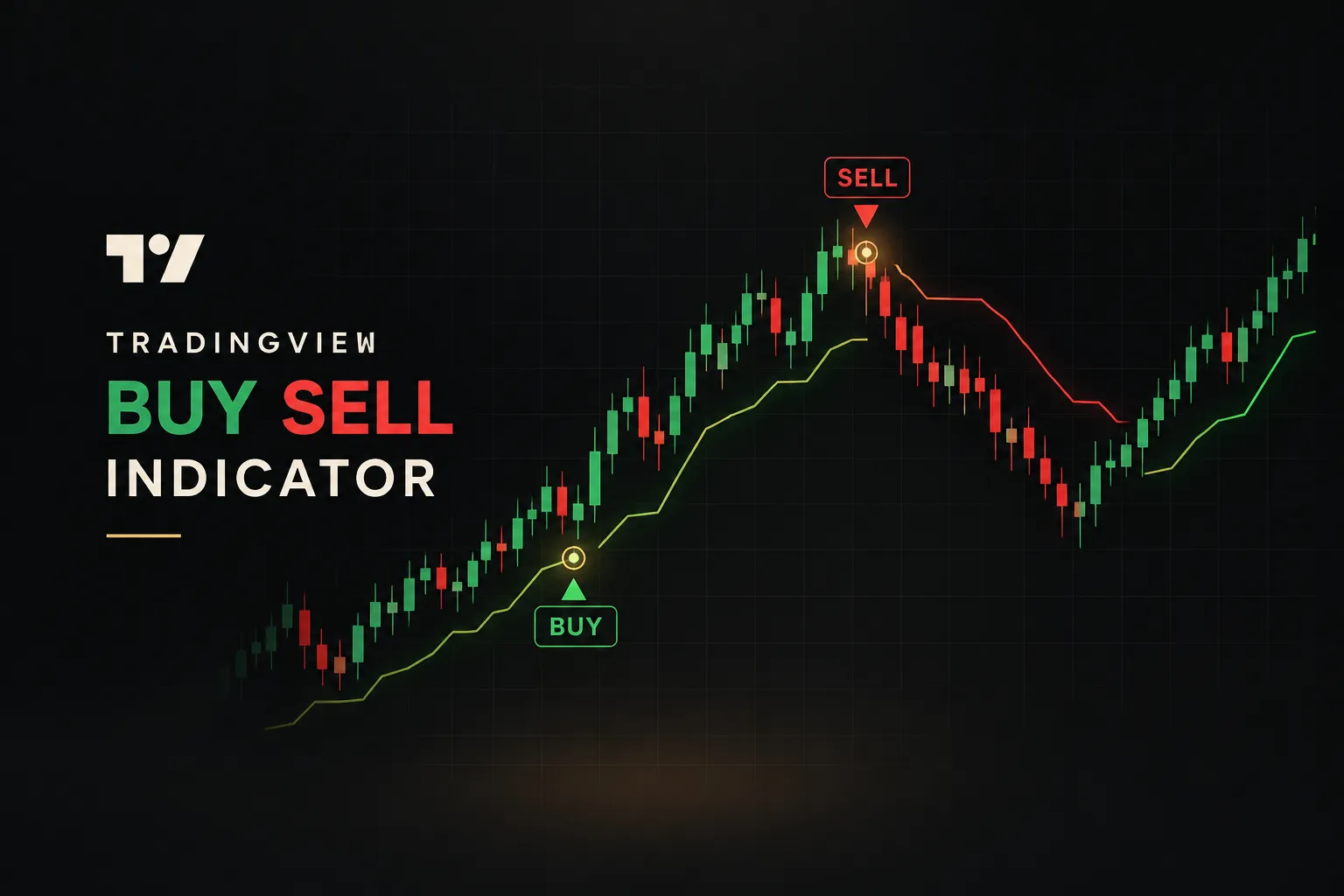
A green arrow appears under a candle, and your finger is already hovering over the buy button.
That reflex is exactly what costs most retail traders money.
The arrow didn’t tell you to buy. It told you a set of conditions was met.
A tradingview buy sell indicator is a chart tool that plots algorithm-generated direction signals based on rules about price, momentum, or volume.
Some use a moving average crossover. Others read RSI extremes, MACD histogram flips, Supertrend band breaks, or volume spikes.
The math varies, but the output is the same: a label or arrow saying “conditions favor up” or “conditions favor down.”
Here’s the part most signal sellers skip.
An arrow represents a probability, not a guaranteed trade recommendation.
Treating buy and sell signals as instructions, instead of hypotheses, is the single most common reason traders lose money with TradingView indicators.
An indicator signal is a question the market hasn’t answered yet. Your job is to check the answer before you pay for it.
This guide follows a practical framework.
First, how signals actually work. Then how to set them up and build alerts properly, how to test for repainting, how to judge real performance (not marketing screenshots), and finally how to combine signals with market context.
Throughout, we’ll use one lens: a transparent, rules-based system versus a black-box arrow generator. If you can’t see why a signal fired, you can’t decide when to ignore it.
And knowing when to ignore a signal is half the skill.
What the signal is really measuring
Most traders judge an indicator by its reputation, its download count, or how clean the arrows look on a historical chart.
None of those tell you whether it works.
What matters is what the signal is measuring and whether that measurement suits the market you’re trading right now.
Before tuning any settings, you need three pieces of background: the difference between an indicator and a strategy, the three types of signal timing, and the specific conditions where each signal type fails.
Indicator versus strategy
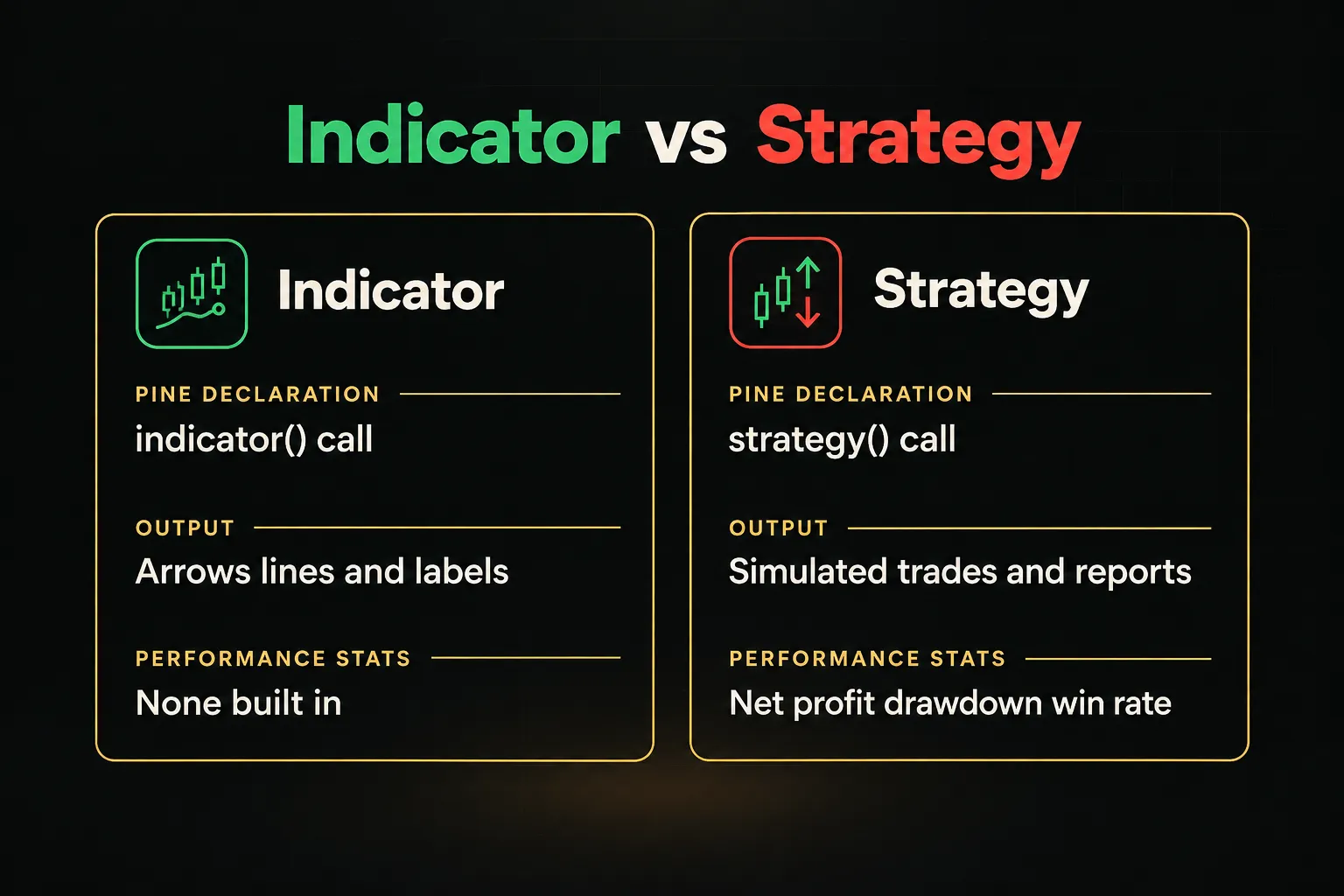
TradingView separates scripts into two categories, and confusing them leads to wildly wrong expectations.
- Indicators are visual overlays. Written in Pine Script with the
indicator()declaration, they plot lines, arrows, labels, and colors. They have no backtest engine, so they cannot tell you net profit, drawdown, or win rate. - Strategies simulate trades. Scripts declared with
strategy()use order calls likestrategy.entry()andstrategy.exit(), which feed the Strategy Tester. That’s where net profit, max drawdown, profit factor, and percent profitable come from. - An indicator alone can’t produce strategy statistics. If someone shows you “92% accuracy” from an indicator, ask how they measured it. Often the number came from manually counting the arrows that worked, which is hindsight, not testing.
- Some developers publish both versions. A strategy twin of an indicator lets you see how the same logic performs with defined entries, exits, and commission settings.
Early, confirmed, and delayed signals
Every buy and sell signal involves a trade-off between speed and reliability.
You can’t have both at maximum.
- Early signals fire while the candle is still forming. They offer the best entry price but are the least reliable, because the condition can un-trigger before the bar closes. This is where most repainting happens.
- Confirmed signals lock in only when the candle closes. They don’t repaint, and the cost is a slight delay, usually one bar. For most traders, a non-repainting indicator with bar-close confirmation is the right default.
- Delayed signals rely on lagging data, such as a 50/200 moving average crossover or a smoothed MACD cross. They’re very reliable once printed but often arrive after a large chunk of the move is gone.
Where signals break down
No signal works in every market condition.
Each family of technical analysis tools has a known failure mode, and you should memorize them.
- Moving-average and crossover systems whipsaw in ranging markets. When price chops sideways, fast and slow averages cross back and forth, generating a string of small losses. A 20/50 EMA cross on a flat EUR/USD session can flip direction four or five times in a day.
- RSI and Stochastic sell signals trigger falsely during strong trends. In a powerful uptrend, RSI can stay above 70 for weeks. Each “overbought” sell arrow becomes a trade against the dominant move.
- Volume-based signals distort during illiquid sessions or news gaps. A volume spike during the Asian session on a US stock, or a gap at the open after earnings, can trigger signals that reflect thin order books rather than real conviction.
- Supertrend and ATR-based bands lag on sharp reversals. The band trails price by design, so a V-shaped reversal can give back a large portion of profits before the flip.
So, how accurate is any given indicator?
Accuracy depends entirely on matching the signal type to the market condition, not on the indicator’s reputation.
A crossover tool that shines in trending crypto can bleed money in a range-bound forex pair.
Same indicator. Different market. Opposite results.
Setting up signals and alerts
There is no single official “buy/sell” indicator on TradingView.
Search for one and you’ll find thousands of results, most of them community scripts of very uneven quality.
Setup matters as much as selection, because a good script with the wrong settings performs like a bad one.
Built-in versus custom indicators
Start by deciding where your signals come from, then tune them for the instrument you trade.
- Open the indicator search. Click “Indicators” at the top of your chart (or press the forward slash key). Built-in options like MA Cross, MACD, RSI, and Supertrend appear under the “Technicals” tab.
- Choose between built-in, community, and invite-only scripts. Built-ins are transparent and stable but rarely plot explicit arrows. Community scripts often add buy/sell labels, and invite-only scripts require access granted by the author.
- Read the source code or description before trusting it. Open-source Pine Script lets you check whether the script uses
barstate.isconfirmedor higher-timeframe calls. Closed scripts should at least explain their logic and repainting behavior in writing. - Adjust settings per symbol and timeframe. Forex pairs have different volatility profiles, crypto trades 24/7 with no session close, stocks have defined market hours and opening gaps, and futures move in fixed tick sizes. A period length that works on a 15-minute BTC chart will likely misfire on a 15-minute ES futures chart.
- Save a template for each setup. Once tuned, save the indicator configuration as a template so you don’t accidentally trade gold with your Nasdaq settings.
Alerts that match your settings
Alerts let you stop staring at charts.
But a badly configured alert will wake you up for signals that no longer exist by the time you look.
- Create the alert from the indicator. Right-click the chart or click the alarm clock icon, then select your indicator and the specific condition (for example, “Buy Signal”) from the dropdown.
- Choose “Once Per Bar Close” as the trigger. Intrabar options like “Once Per Bar” fire the moment a condition is met mid-candle. Bar-close alerts reduce false signals caused by conditions that appear and vanish before the candle finishes.
- Write a useful alert message. Use placeholders such as
{{ticker}},{{interval}}, and{{close}}. A message like “BUY {{ticker}} on {{interval}} at {{close}}” tells you exactly what happened without opening the app. - Recreate alerts after changing inputs. Alerts store a snapshot of the indicator’s settings at creation time. If you change a length from 14 to 21, the old alert keeps running on 14, so delete it and build a new one.
- Pick your delivery channels. Enable app push, email, sound, or webhook delivery. Webhooks are what traders use to connect alerts to journaling tools or execution bridges.
Checking for repainting and hindsight bias
The prettiest indicator charts are often the most dishonest.
A script that places every arrow at the exact top and bottom of every swing is almost certainly using information that wasn’t available at the time.
That’s look-ahead bias, and it’s the most expensive illusion in retail trading.
A practical repainting checklist
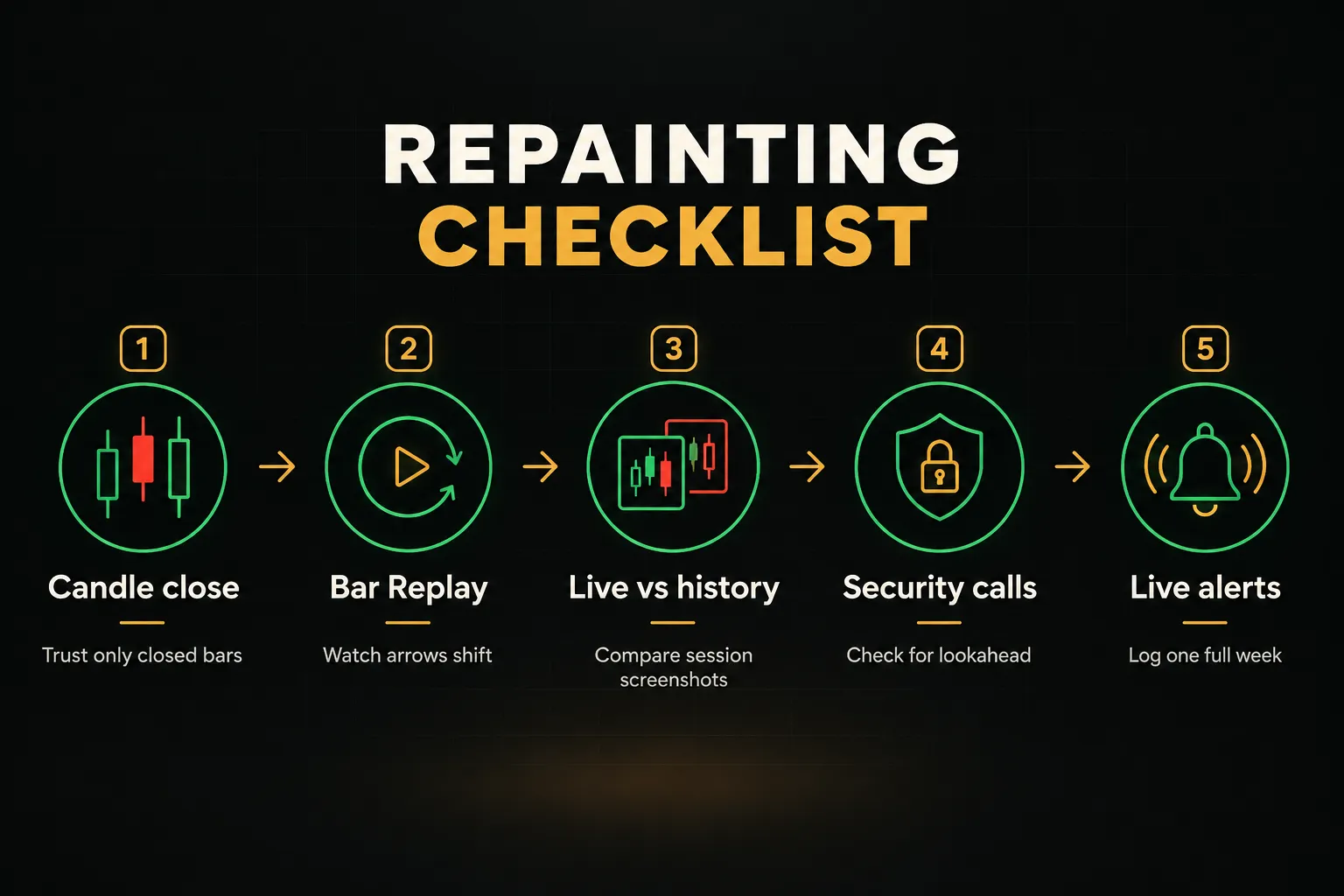
Run every new script through these five checks before you trust a single arrow with real money.
- Wait for candle close before trusting a signal. If an arrow appears mid-candle and disappears before close, the script repaints at the intrabar level. Watch at least 10 to 20 live bars on a short timeframe and note any arrows that vanish.
- Use Bar Replay to see if arrows shift after the fact. Replay a historical period candle by candle. If arrows appear several bars late, or move position as new bars print, the historical chart is misleading you.
- Compare live chart behavior against the same period loaded historically. Screenshot your chart at the end of a session, then reload it the next day. Any difference in arrow placement is repainting, plain and simple.
- Inspect multi-timeframe calls for look-ahead leakage. In Pine Script,
request.security()withlookahead = barmerge.lookahead_onand no[1]offset pulls in the higher-timeframe bar’s final value before that bar has closed. The historical chart looks perfect. Live, it falls apart. - Test alerts in real time for at least a week. Log every alert with time and price. Then compare your log against what the chart shows afterward. Mismatches mean the chart history is not what you would have actually seen.
That fourth check deserves emphasis.
A signal relying on unconfirmed higher-timeframe data can show false historical accuracy that disappears live. A 1-hour chart that peeks at the still-forming 4-hour candle will appear to “know” the 4-hour trend in advance.
In real time, it doesn’t.
What backtests leave out
Even a properly built, non-repainting strategy produces backtests that flatter reality. Here’s what typically goes missing:
- Commissions. TradingView’s Strategy Tester defaults to zero commission unless you set it. On a scalping system with 400 trades a month, fees alone can turn profit into loss.
- Spread. Backtests usually fill at the chart price, which on most feeds is the bid. You pay the ask when buying, and on a volatile pair that gap can widen sharply around news.
- Slippage. Market orders during fast moves fill worse than the trigger price. The Strategy Tester has a slippage setting measured in ticks, and most published backtests leave it at zero.
- Realistic order execution. Simulations may fill limit orders the instant price touches them. In live markets, touching a level doesn’t guarantee your order is reached in the queue.
- Liquidity constraints. Instant-fill simulations assume unlimited depth. Trading a small-cap stock or a minor altcoin, your own order can move the price.
Then there’s the metric problem.
Win rate is the number everyone quotes, and it’s close to useless on its own.
Expectancy tells you what you actually earn per trade on average: (average win × win rate) minus (average loss × loss rate).
Consider two systems.
System A wins 70% of the time, averaging $50 per win and $150 per loss: (0.7 × 50) − (0.3 × 150) = −$10 per trade.
System B wins just 40%, averaging $300 per win and $100 per loss: (0.4 × 300) − (0.6 × 100) = +$60 per trade.
The “worse” system makes money.
The impressive one quietly drains your account.
Pair expectancy with maximum drawdown, the largest peak-to-trough equity drop.
A positive-expectancy system with a 45% drawdown may be mathematically sound and psychologically impossible to follow.
Finally, demand out-of-sample testing with a meaningful sample size (at least 100 trades is a common minimum), on data the settings were never optimized against.
Trading signals with real market context
Here’s a counterintuitive truth: the best traders using buy and sell signals reject more arrows than they take.
The signal is a filter that narrows attention.
Context decides whether you act.
Three layers of context matter most: market structure, a clean separation between direction and entry, and a firm list of reasons to walk away.
Reading signals with market structure
Start every analysis one or two timeframes above the one you trade.
If you’re entering on the 15-minute chart, check the 1-hour and 4-hour first.
Trend confirmation on the higher timeframe tells you which arrows on your trading timeframe are aligned with the bigger flow and which are fighting it.
A 15-minute buy signal inside a clear 4-hour downtrend isn’t necessarily wrong.
But it’s a counter-trend trade, and it deserves smaller size and tighter targets.
A 15-minute buy aligned with a 4-hour uptrend is a different proposition entirely.
Then check location.
Avoid buy signals that fire directly into major resistance, and avoid sell signals that fire directly into major support.
An arrow pointing up when price sits $2 below a level that has rejected three times this month is asking you to buy at the worst possible spot.
Support and resistance, prior swing highs and lows, and round numbers all shape where price is likely to stall.
Separating entries from exits
Most traders let the arrow do everything: direction, entry, stop, and exit.
That’s too much weight for one signal to carry.
A sturdier approach splits the job into distinct pieces.
Use the signal for direction only.
Then use a separate price level for the actual entry, such as a support or resistance zone, VWAP, or a supply and demand area.
If the arrow says “up,” you wait for price to pull back to a level where the risk is defined, rather than chasing the candle that triggered the signal.
Stops, take-profits, and trailing rules should be independent too.
Place stops beyond structure (below the swing low or the demand zone), not at an arbitrary percentage.
Set targets at the next opposing level.
And apply the same rules on every trade, because inconsistent exits make your results impossible to evaluate.
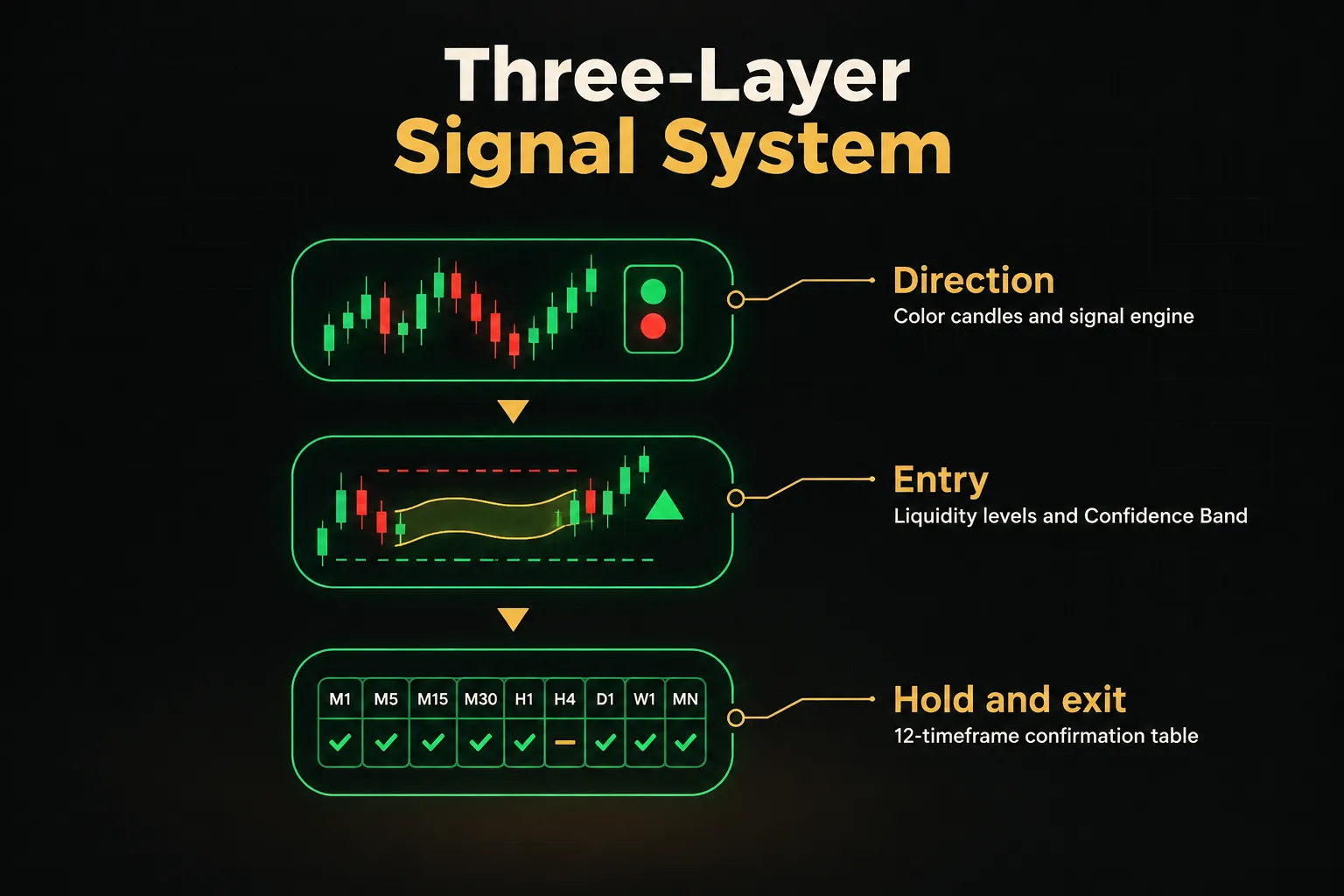
PipTrend is a concrete example of this separation built into one system.
Direction comes from color-coded candles and a smart signal engine.
Entry comes from marked liquidity levels and the Confidence Band, which define where a trade makes sense rather than where the arrow happened to print.
And hold and exit decisions come from a 12-timeframe confirmation table that shows whether multi-timeframe analysis still supports the position.
What makes that structure trustworthy is transparency.
PipTrend publishes trade outcomes, including losses, on a public results page.
You can see how signals actually performed rather than relying on cherry-picked chart screenshots.
That’s the difference between a rules-based system and a black box.
If a signal provider only shows you winners, you’re looking at marketing, not performance.
When to reject a signal
Discipline lives in the trades you don’t take.
Skip the signal, no matter how clean the arrow looks, when any of these conditions apply.
Poor risk-reward near major resistance or support. If the distance to the next opposing level is smaller than your required stop, the math doesn’t work.
A 1:0.8 reward-to-risk setup needs an unrealistically high win rate to break even.
Thin liquidity or off-session volume.
Volume confirmation matters.
A breakout signal on a US equity at 4:30 AM pre-market, or on a forex pair during the late Friday rollover, often reflects a few orders rather than real participation.
Minutes before high-impact news. CPI, central bank decisions, nonfarm payrolls, and major earnings can erase any technical setup in seconds.
Spreads widen, slippage spikes, and the arrow becomes irrelevant.
Check the economic calendar before every session.
Timeframes disagree with each other. If the 15-minute says buy, the 1-hour is neutral, and the 4-hour says sell, you don’t have a signal.
You have noise.
Wait for alignment or pass entirely.
Another setup will come… it always does.
Frequently asked questions
What is the most accurate buy and sell indicator for TradingView?
There is no universally “most accurate” buy and sell indicator on TradingView. Accuracy depends on the market condition, the timeframe, and whether the signal is confirmed at bar close or fires early.
A moving average crossover can perform well in trending markets and poorly in ranges, while RSI-based tools behave the opposite way. Judge any indicator by its expectancy and drawdown in your specific market, not by claimed win rates.
How do I show buy and sell signals on TradingView?
You show buy and sell signals by adding an indicator through the chart’s indicator search, then enabling its plot or label settings. Click “Indicators,” search for a buy/sell script, and add it to your chart.
Open the indicator’s settings (the gear icon) and check the “Style” tab to make sure arrow, shape, or label plots are switched on. Some scripts hide labels by default to keep the chart clean.
What is the best free buy and sell indicator on TradingView?
The best free options are built-in tools like MA Cross, MACD, and Supertrend, plus well-documented open-source community scripts. They’re a solid starting point for learning technical analysis.
The limitation is that free indicators usually lack confirmation layers or multi-timeframe context. Without those filters, they tend to generate more false signals, especially in choppy markets.
Do TradingView indicators repaint?
Yes, many TradingView indicators can repaint.
Repainting happens when a script uses unconfirmed intrabar data or pulls higher-timeframe values without a proper offset, so past signals change after the fact.
The simplest fix is waiting for bar close before acting on any signal and setting alerts to “Once Per Bar Close.” For deeper verification, use Bar Replay and compare live behavior against reloaded history.
How do you confirm buy and sell signals?
You confirm a signal by checking it against a second, independent factor before entering. Good confirmation sources include market structure, volume, and a higher-timeframe trend check.
The key word is independent.
Confirming an RSI signal with a Stochastic signal adds little, since both measure similar momentum.
Pairing a momentum arrow with a support level or a 4-hour trend filter gives you genuinely new information.
Can TradingView send alerts for buy and sell signals?
Yes, TradingView can send alerts for buy and sell signals from any indicator condition, including custom Pine Script buy/sell scripts. Delivery options include mobile app push notifications, email, on-screen popups, sounds, and webhooks.
Alert availability depends on your plan, as of 2026, with higher tiers allowing more simultaneous active alerts. Remember to recreate alerts after changing indicator inputs.
The takeaway for your next trade
One rule covers almost everything in this guide.
Treat every arrow as a hypothesis to confirm with structure and risk rules, never as an instruction to click buy or sell.
The signal starts the analysis.
It doesn’t finish it.
Your next step depends on where you are.
If you’re new, start with confirmed, non-repainting signals and a rules-based system whose logic you can see and test.
If you’re experienced, run your own repaint checks and expectancy calculations before trusting any script, no matter how many likes it has.
Either way, don’t validate a tradingview buy sell indicator with real money first.
Paper trade it for a few weeks, log every signal, and compare results against your rejection checklist.
A free trial period, such as PipTrend’s 3-day trial, is another practical way to see how a system behaves on live charts before you commit capital.
Test first. Trade second. That order protects your account.
Sources
Risk Disclaimer: Trading involves risk. Past performance doesn't guarantee future results. Only trade with money you can afford to lose. PipTrend is a tool to assist your trading decisions, not financial advice.