In short: PipTrend V2.0 answers one question: is the trend bearish or bullish?
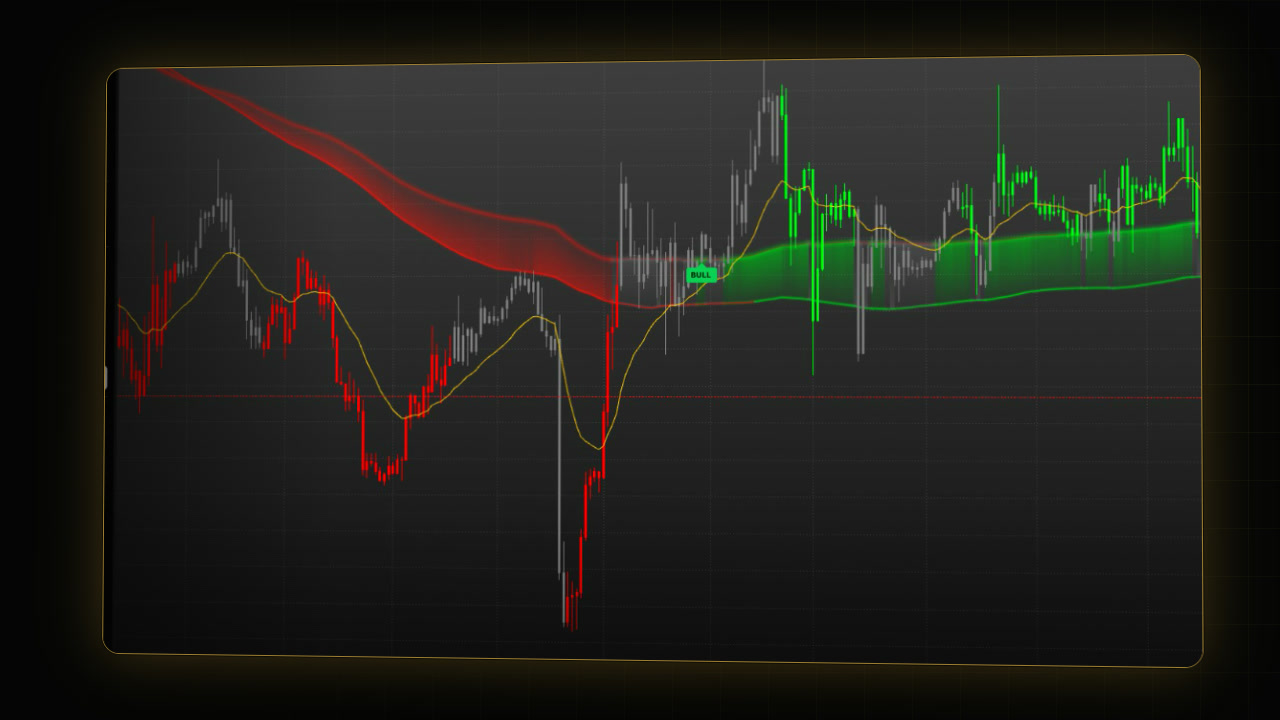
- Candles: green means an aligned uptrend, red an aligned downtrend, and gray means the trend is stopping or shifting.
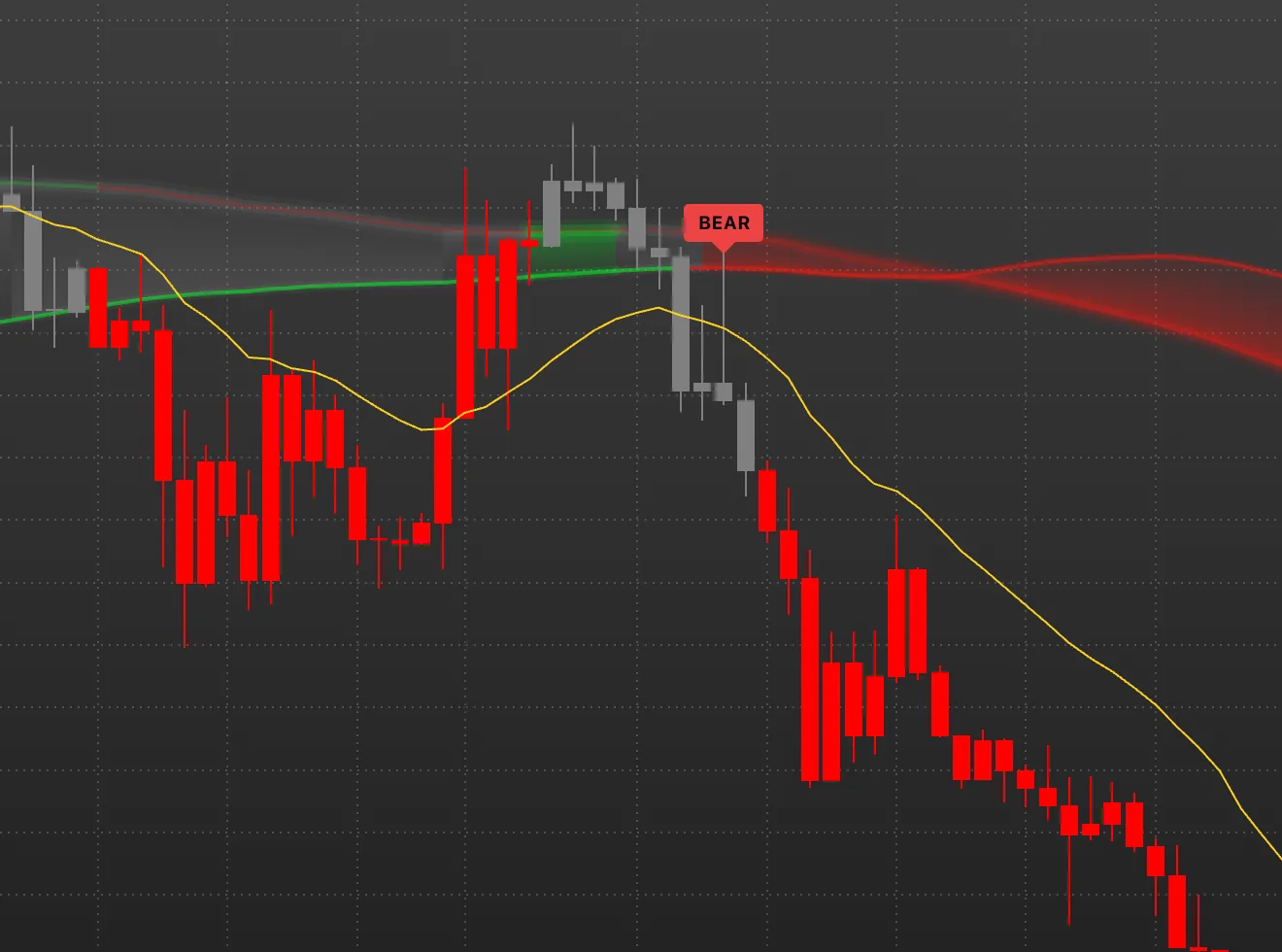
- Labels: a BULL or BEAR label prints at the close of the candle that confirms a new trend side.
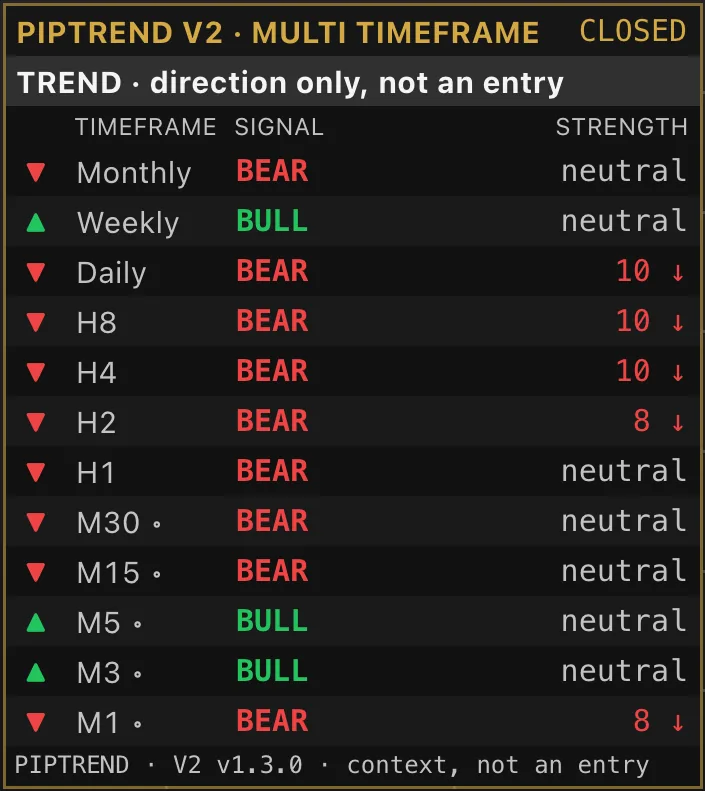
- Panel: the multi timeframe panel shows the same reading on twelve timeframes.
When the higher timeframes disagree and the band runs flat, expect a range, not a trend. A label names the trend side; it is not an entry.
 Video coming soon
This guide assumes PipTrend V2.0 is already on your chart with TradingView’s own candles hidden. If not, start with How to add PipTrend and show the PipTrend candles. In the chart legend the script is called PipTrend V2 · Trend. For complete strategies, see the Learn section. For an overview of what PipTrend is, see the PipTrend indicator page.
PipTrend V2.0 is a Trend indicator: it reads the trend and draws the candles. PipTrend also has Key Levels indicators, which mark where price may react, and Trade Setups indicators, which give a complete setup for one trading style.
What do the green, red and gray candles mean?
| Colour | Meaning |
|---|---|
| Green | The short-term trend is lined up upward and agrees with the longer trend. |
| Red | The same, downward. |
| Gray | The trend is stopping or shifting. |
Gray areas are worth watching. Together with your own analysis and other tools, for example PipTrend Zones or liquidity levels, you can use them to find an entry or to exit a position.
Candle display switches between PipTrend candles, Normal candles and Hidden. Candle gaps sets how each candle’s open is drawn and never changes the colour or the signals. Both are explained in the add PipTrend guide.
BULL and BEAR labels: the trend side
- BULL or BEAR prints at the close of the candle that confirms a new trend side.
- BULL (Flag Range) or BEAR (Flag Range) marks a tight pause inside the band during a gray phase that arms that side early. It does not set the side on its own.
A label prints after the move has started, so it never calls tops or bottoms. It names the trend side; the entry comes from your own method.
The Confidence Band
The shaded band between two long trend lines, the Baseline and the Anchor.
- Green after a BULL label, while price is above the band.
- Red after a BEAR label, while price is below the band.
- Neutral otherwise.
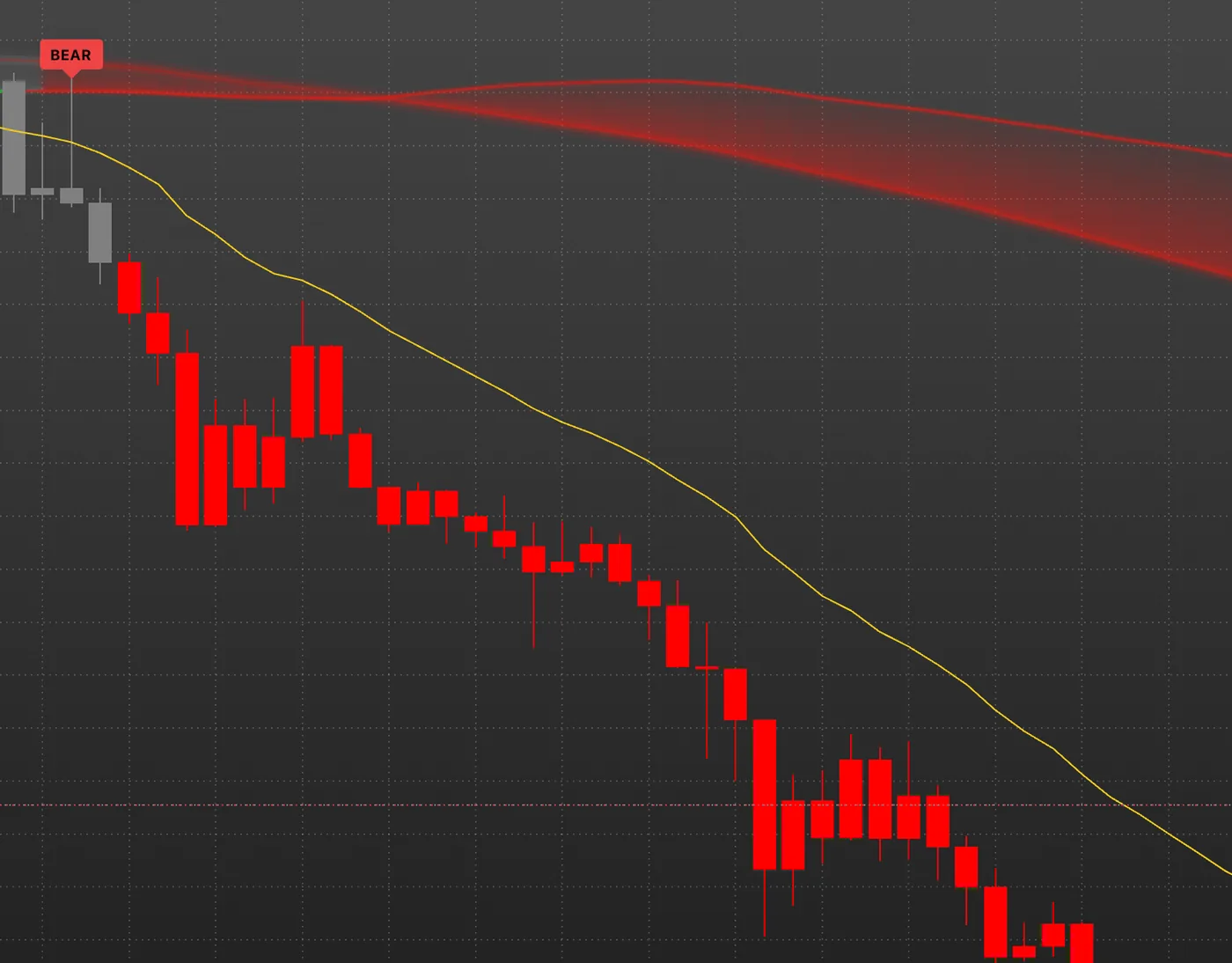
Band glow (on by default) adds a soft glow that brightens as price moves away from the band. It is display only, not a strength reading.
Chart lines
- Guide line (21 EMA): the yellow line, always shown.
- Scalp line (9 EMA) and Swing line (50 EMA): optional helper lines, off by default.
- Price line: a dotted line at the current price, in the colour of the current candle.
- Sonar point: a dot on the current candle, in the rising or falling colour. Current candle only by default.
The multi timeframe panel
Bottom right by default, titled PIPTREND V2 · MULTI TIMEFRAME.
- Type row: “TREND · direction only, not an entry” says what the script prints.
- Rows: twelve timeframes, from Monthly down to M1.
- SIGNAL: the side of the last label on that timeframe: BULL, BEAR or NEUTRAL.
- STRENGTH: 0 to 10 with an arrow. It reads neutral while that timeframe’s candles are gray.
- Chip: CLOSED or LIVE, set by Panel mode. Closed candles (the default) reads the last finished candle of each timeframe. Live candles follows the forming candle.
- Rows marked ◦ are below the chart’s timeframe or don’t line up with it, and always follow the latest candle.
- warming up: the chart has not loaded enough history for that timeframe yet.
Is the market trending or ranging?
The candles alone tell you the short-term side. The band and the panel tell you whether a real trend stands behind it.
- A range: in the video, EURUSD on 1 hour shows green candles, so the short-term trend pointed up. But the panel showed strong bearish pressure on the higher timeframes (Daily, H8 and H4 read BEAR), and the band was flat. That is why the market ranged without a strong move up. When the higher timeframes disagree and the band runs flat, expect a range, not a trend.
- An established uptrend: the candles stay green with only short gray pauses, the band is green and slopes upward, price holds above it, and the higher timeframes read BULL too.
- An established downtrend: the mirror. Red candles, a red band sloping down with price below it, and the panel reading BEAR from the daily chart down.
One entry model: the band retest
An example of how the parts work together. It is one model, not the only way to trade V2.0.
- The move: a strong move down and a BEAR label. Don’t sell into the move.
- The retest: wait for price to come back and retest the Confidence Band.
- The trigger: the market turns bearish again. Price rejects the band, and a candle closes back below the yellow Guide line, the 21 EMA.
- Mark it: use the Short position tool from the drawing tools. Put the entry at the close back below the Guide line, the stop above the retest high, and the target at the last low.
- The risk: fix your risk before the trade.
In the video, the model is marked twice on the S&P 500 1-hour chart (OANDA, Budapest time): Friday 16 October at 16:00 and Thursday 22 October at 02:00. These are past examples, picked to show the model, not a performance record.
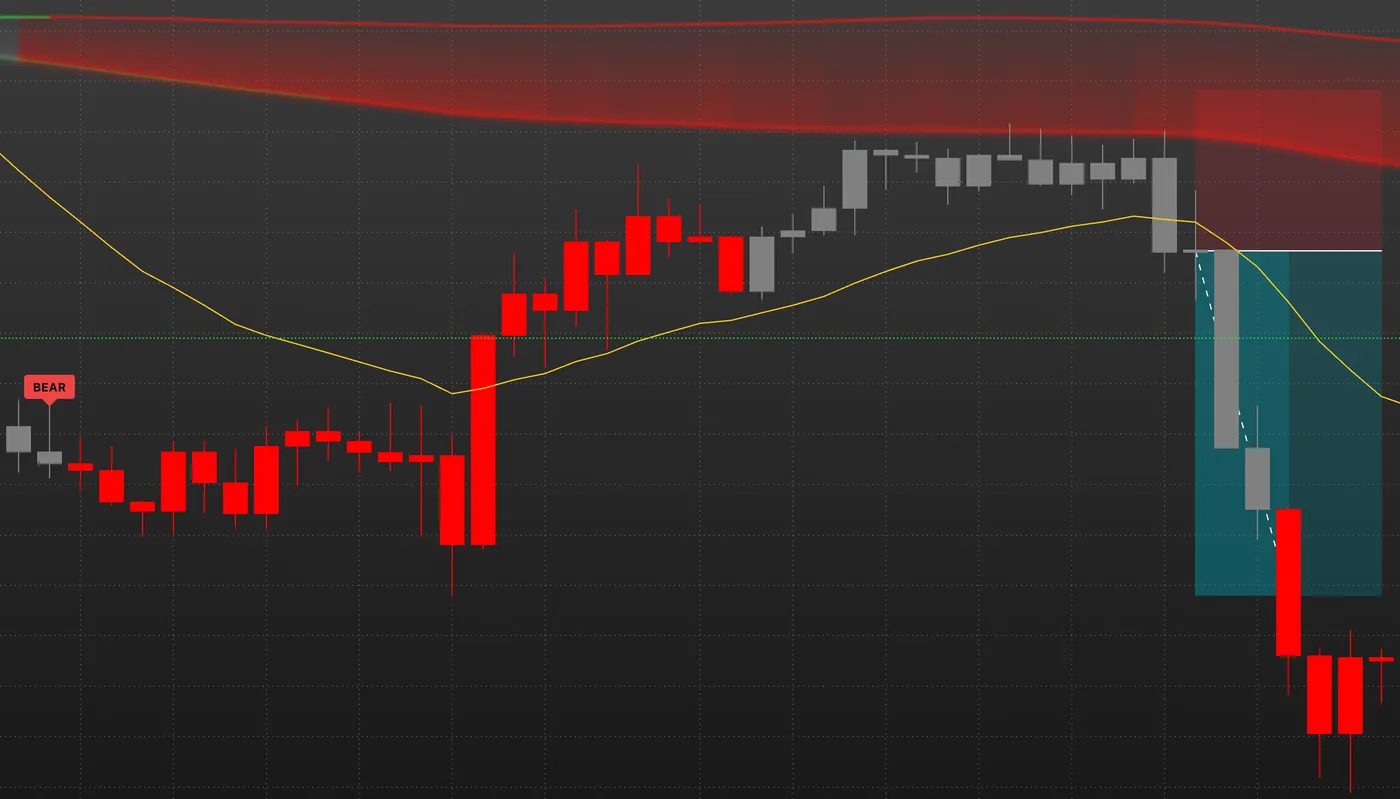
For buys it is the mirror image: a BULL label, a pullback into the band, and a close back above the Guide line.
How to use it
- Read the side: the last BULL or BEAR label and the candle colour.
- Check the panel: your timeframe should agree with at least the next higher timeframe. If they conflict, as on a ranging chart, skip or wait.
- Plan your entry: for example with the band retest, and watch the gray areas, where the trend stops or shifts, for entries and exits, aligned with your own analysis.
- Manage the trade: while the panel stays aligned, the side holds. When your timeframe flips or the opposite label prints, exit or tighten your stop.
What is fixed and what moves
- Calculated on closed candles: the BULL, BEAR and Flag Range labels and every alert. In Closed candles panel mode, the row of your chart’s timeframe and the higher rows that line up with it.
- Live until the candle closes: the colour of the forming candle, the Confidence Band with its lines, fill and glow, the chart lines, the sonar point, the price line, the rows marked ◦, and every row in Live candles mode.
- History matters: the trend state starts at the first candle the chart loads, so labels can differ between a chart with more history and one with less. The chart keeps up to 500 labels.
Make your decisions on closed candles.
The settings
Double-click PipTrend V2 · Trend in the top left of the chart and open the Inputs tab. The groups:
| Group | What you set there |
|---|---|
| ALERTS | Bull alerts (any alert() call), Bear alerts (any alert() call) |
| CANDLES | Candle display, Candle gaps, Hour gap that marks a day open, the PipTrend and normal candle colours |
| CHART LINES | Price line, Sonar point, Sonar point position, Scalp line (9 EMA), Swing line (50 EMA), Band glow, the band line colours |
| MULTI TIMEFRAME PANEL | Show the panel, Panel mode, Corner, Text size |
| SIGNAL LABELS | Label size, Bold label text |
| COLOURS | Bull, Bear, Waiting, Panel accent |
| PANEL ROWS (ADVANCED) | one switch per timeframe row |
The table is for orientation. Colours of the Baseline, Anchor and helper lines are on the Style tab.
Stack PipTrend indicators
You can combine PipTrend indicators on one chart, one per family. Use one indicator that draws candles (Trend or Trade Setups) and add Key Levels on top, for example:
- PipTrend V2.0 (Trend) for the trend,
- PipTrend Zones (Key Levels) for the key levels,
- PipTrend Session Liquidity (Key Levels) for the session highs and lows.
Where they line up, you have confluence. See Build your PipTrend chart for combinations per trading style.
Alerts
V2.0 has named alerts for the BULL and BEAR labels, early warnings when a side becomes armed, the Flag Range labels, a Neutral alert when the candles turn gray, and six trend line crosses. Every named alert fires at the candle close. The full list and the setup are in PipTrend alerts.
PipTrend Classic vs V2.0: what is the difference?
| PipTrend V2.0 | PipTrend Classic | |
|---|---|---|
| Candles | green, red, gray | the same colouring |
| Signals | built to cut down extra labels while a trend shifts | earlier, so more labels while a trend is shifting |
| On the chart | Confidence Band, Guide line | six trend lines, trend markers |
| Flag Range labels | yes | no |
| Early warning and Neutral alerts | yes | no |
We built V2.0 to make trend shifts easier to spot. If you use both on one chart, let one of them draw the candles and set the other one’s Candle display to Hidden.
Limits, stated plainly
- A label marks the trend side, not an entry, and has no validated performance record.
- A label prints after the move has started. It does not call tops or bottoms.
- The entry model is an example of reading the indicator, not a recommendation to trade.
- The script does not know the news calendar.
FAQ
What do the gray candles mean in PipTrend V2.0?
Gray means the trend is stopping or shifting. Those areas are worth watching: together with your own analysis and other tools, such as zones or liquidity levels, you can use them to find an entry or an exit.
Is a BULL or BEAR label an entry signal?
No. It names the trend side, confirmed at the close of a candle. One way to enter is the band retest: wait for price to come back to the Confidence Band and turn again, with a close back beyond the Guide line.
Why are the candles green but the market is not moving up?
Check the panel and the band. If the higher timeframes read BEAR and the band is flat, the market is likely ranging: the short-term side is up, but no trend stands behind it.
Does PipTrend V2.0 repaint?
The labels and the alerts are calculated on closed candles only, so a printed label stays. The colour of the forming candle, the band and the lines can change until that candle closes.
What is the difference between PipTrend Classic and V2.0?
Both colour the candles the same way. Classic signals earlier, so it prints more labels while a trend is shifting. V2.0 was built to cut those down, so trend shifts are easier to spot, and it adds the Confidence Band, Flag Range labels, and early warning and Neutral alerts.
Does PipTrend give buy and sell signals?
A BULL or BEAR label names the trend side at a candle close. It is not an entry: the entry comes from your own method. The band retest above is one example of an entry model, not the only way to trade V2.0.
Which timeframes does the multi timeframe panel show?
Twelve, from Monthly down to M1. Each row shows the SIGNAL (BULL, BEAR or NEUTRAL), the STRENGTH from 0 to 10, and the header chip shows CLOSED or LIVE, depending on Panel mode.
Transcript
Full transcript
This is PipTrend V2.0, and these are the basics. V2.0 answers one question: is the trend bearish or bullish? It colours the candles, prints a label when a new trend side is confirmed, draws the Confidence Band, and shows the same reading for twelve timeframes in one panel. It doesn’t place your entries for you, but near the end you’ll see one simple entry model. For complete strategies, visit the strategy section on piptrend.com.
Start with the candles. Green means the short-term trend is lined up upward and agrees with the longer trend. Red is the same, downward. Gray means the trend is stopping or shifting. Those gray areas are worth watching. Together with your own analysis and other tools, like PipTrend Zones or liquidity levels, you can use them to find an entry, or to exit a position.
A BULL or BEAR label prints at the close of the candle that confirms a new trend side. Here, a BULL label started the green run, and this BEAR label turned the side down. A label names the trend side. It’s not an entry, and it comes after the move has started, so it never calls tops or bottoms. You may also see BULL or BEAR with Flag Range in brackets. It marks a tight pause inside the band during a gray phase, and arms that side early.
The shaded area is the Confidence Band. Its edges are two long trend lines, the Baseline and the Anchor. The band turns green after a BULL label while price stays above it, red after a BEAR label while price stays below it, and neutral otherwise. The soft glow brightens as price moves away from the band. It’s display only, not a strength reading.
The yellow line is the Guide line, a 21 EMA, and it’s always on. You can add a faster Scalp line and a slower Swing line in the settings. Both are off by default. The dotted line at the current price takes the colour of the current candle. And the small dot on the last candle, the sonar point, shows whether that candle is rising or falling.
Bottom right is the multi timeframe panel. The row under the header says what it shows: the trend direction only, not an entry. Each row is a timeframe, from monthly down to one minute. The signal column shows the side of the last label on that timeframe: BULL, BEAR or NEUTRAL. Strength runs from zero to ten, with an arrow, and reads neutral while that timeframe’s candles are gray.
The chip in the header shows the panel mode. Closed, the default, reads the last finished candle of each timeframe. Live follows the forming candles instead. Rows marked with a small dot are below your chart’s timeframe, and always follow the latest candle. And a row that reads warming up just needs more history to load.
Now put it together on this chart. The candles here turned green, so the short-term trend pointed up. But look at the panel: the higher timeframes show strong bearish pressure. And the band is flat. That’s why the market ranged here, without a strong move up. When the higher timeframes disagree and the band runs flat, expect a range, not a trend.
Compare that with an established uptrend. The candles stay green, with only short gray pauses. The band is green and slopes upward, price holds above it, and the panel agrees: the higher timeframes read BULL too.
And here’s the mirror, an established downtrend. Red candles, a red band sloping down with price below it, and the panel reading BEAR from the daily chart down. This is what an aligned trend looks like.
Here’s one entry model, on the S&P 500. After a strong move down and a BEAR label, don’t sell into the move. Wait for price to come back and retest the Confidence Band. The entry comes when the market turns bearish again: price rejects the band, and a candle closes back below the yellow Guide line, the 21 EMA. Mark it with the short position tool: the stop above the retest high, and the target at the last low. On this chart, the setup came twice: here, and here. These are past examples, picked to show the model, not a performance record. Fix your risk before the trade. For buys, it’s the mirror image: a BULL label, a pullback into the band, and a close back above the Guide line.
Here’s how to use it. First, read the side: the last label and the candle colour. Second, check the panel. Your timeframe should agree with at least the next higher one. If they conflict, like on the ranging chart, skip or wait. Third, plan your entry, for example with the band retest, and watch the gray areas, where the trend stops or shifts, for entries and exits, aligned with your own analysis. And fourth, while the panel stays aligned, the side holds. When your timeframe flips, or the opposite label prints, exit or tighten your stop.
What’s fixed, and what moves? The labels and their alerts are calculated on closed candles only, so a printed label stays where it is. The colour of the forming candle, the band and the lines can still move until that candle closes. So make your decisions on closed candles.
To change any of this, double-click the name, top left. The Inputs tab is grouped: alerts, candles, chart lines, the multi timeframe panel, signal labels and colours. Under Chart lines, you’ll find the Scalp line and the Swing line. Under the panel, its mode and its corner. Click Cancel to leave everything as it is.
You can also combine PipTrend indicators and stack them on one chart. For example, V2.0 for the trend, Zones for the key levels, and Session Liquidity for the session highs and lows. Where they line up, you have confluence.
If you also have PipTrend Classic: it colours the candles the same way, but its signals come earlier, so while a trend is shifting it prints more labels. We built V2.0 to cut that down, so trend shifts are easier to spot. If you use both on one chart, let one of them draw the candles. Next, see PipTrend Session Liquidity: killzones and the day’s key levels.
Related guides
- PipTrend Session Liquidity guide
- PipTrend alerts: every alert condition explained
- Build your PipTrend chart: which indicators to combine
Risk Disclaimer: Trading involves risk. Past performance doesn't guarantee future results. Only trade with money you can afford to lose. PipTrend is a tool to assist your trading decisions, not financial advice.
Finished this guide?
Was this guide helpful?