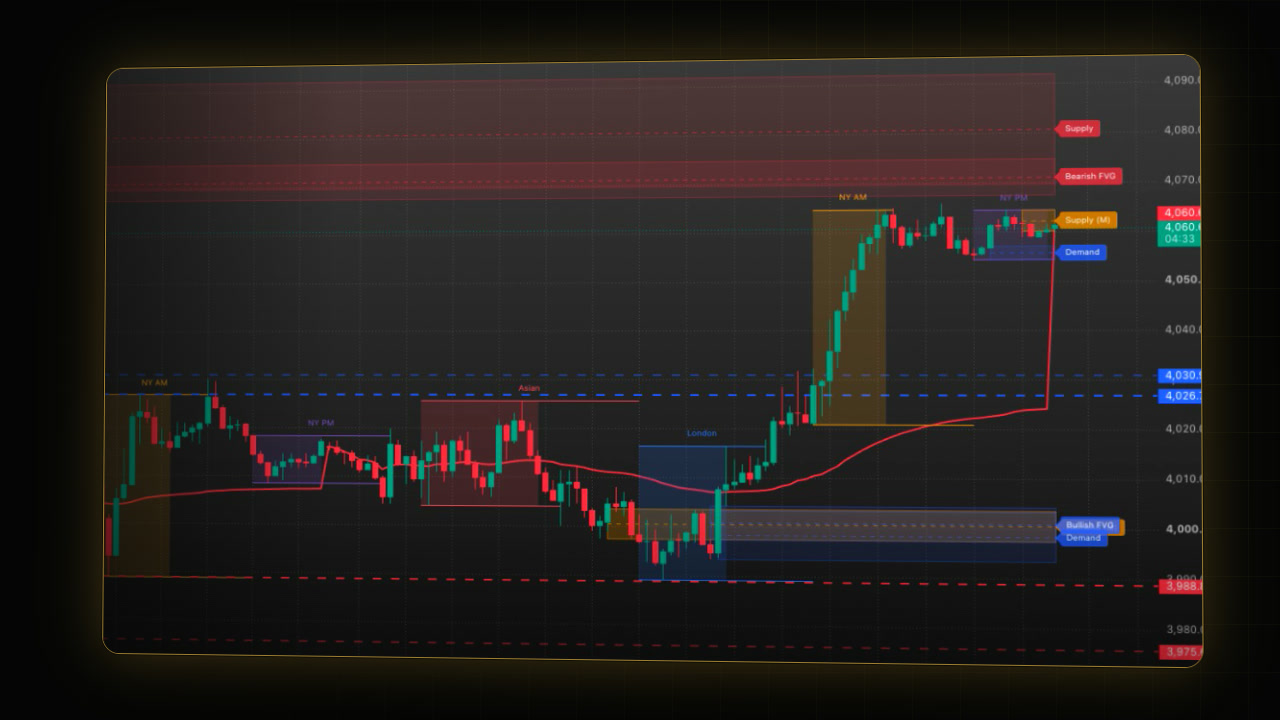
In short: PipTrend Session Liquidity marks when and where intraday price tends to react. It draws no candles and gives no buy or sell signal.
- Killzones: boxes for the active hours of Asia, London, New York AM and New York PM, each in its own market’s time zone.
- Liquidity lines: HOD and LOD are the high and low of the London and New York windows of the last finished trading day; Prev HOD and Prev LOD are the same from the day before.
- VWAP, fair value gaps, supply and demand zones: the day’s average price and the areas price may come back to.
Decide the direction first, then wait for a killzone and for price to reach a level in your direction.
 Video coming soon
PipTrend Session Liquidity is a Key Levels indicator: it marks where price may react and draws no candles, so it sits on top of any chart. PipTrend also has Trend indicators, such as PipTrend V2.0, which read the trend, and Trade Setups indicators, which give a complete setup for one trading style.
Step 1: Add it and switch to 15 minutes
- On your TradingView chart, click Indicators in the top toolbar.
- Click Invite-only scripts on the left.
- Click PipTrend Session Liquidity. In the chart legend it shows as PipTrend Liquidity, followed by the VWAP value.
- Switch the chart to 15m. The killzone boxes and the VWAP show on charts up to 15 minutes by default.
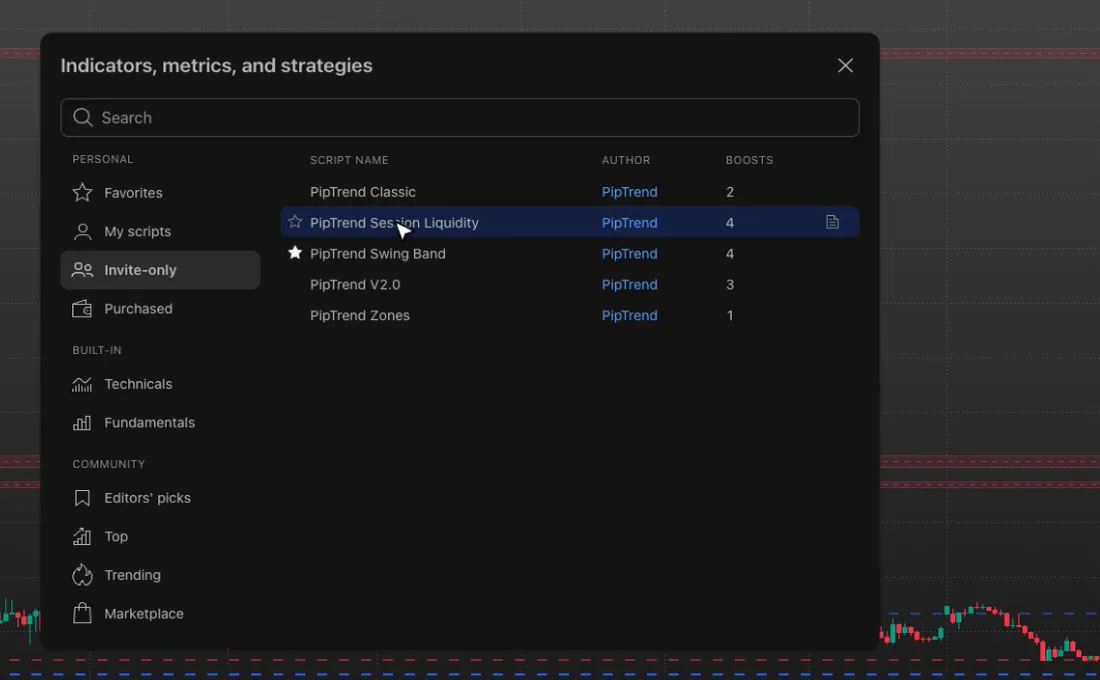
The indicator is built for intraday charts of 1 to 30 minutes on forex majors, gold and US indices. If it is missing from Invite-only scripts, see How to add PipTrend and show the PipTrend candles.
What are the killzone times?
The boxes are the killzones, the active hours of each session (orientation only):
| Killzone | Default window | Time zone |
|---|---|---|
| Asia | 09:00 to 13:00 | Singapore |
| London | 08:00 to 11:00 | London (follows GMT and BST) |
| New York AM | 09:30 to 12:00 | New York (follows EST, EDT) |
| New York PM | 14:30 to 17:00 | New York (follows EST, EDT) |
Each window follows its own market’s clock, including daylight saving, so you never retype them when the clocks change.
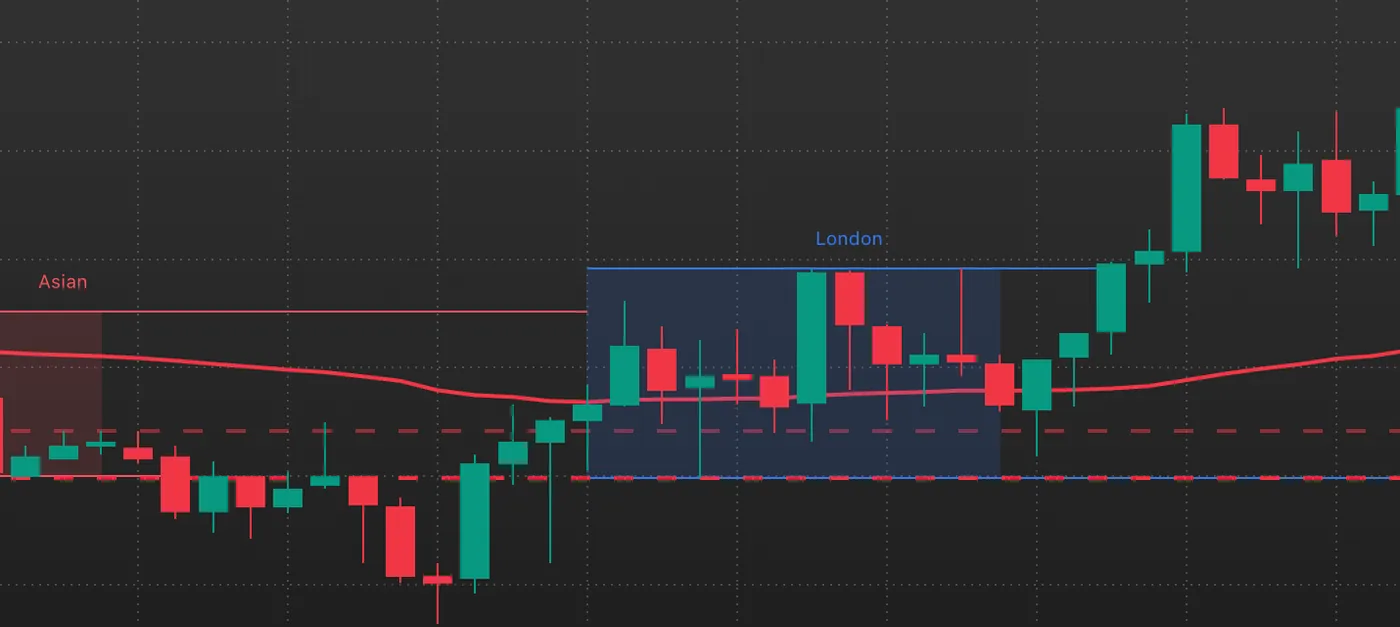
To change them, double-click PipTrend Liquidity in the legend. Under KILLZONES, each row has a switch, a colour and a start and end time. Session high / low lines marks each box’s high and low until price breaks them. Show on timeframes up to (minutes) sets the highest chart timeframe for the boxes and the VWAP (15 by default; 0 switches both off).
What are the HOD and LOD liquidity lines?
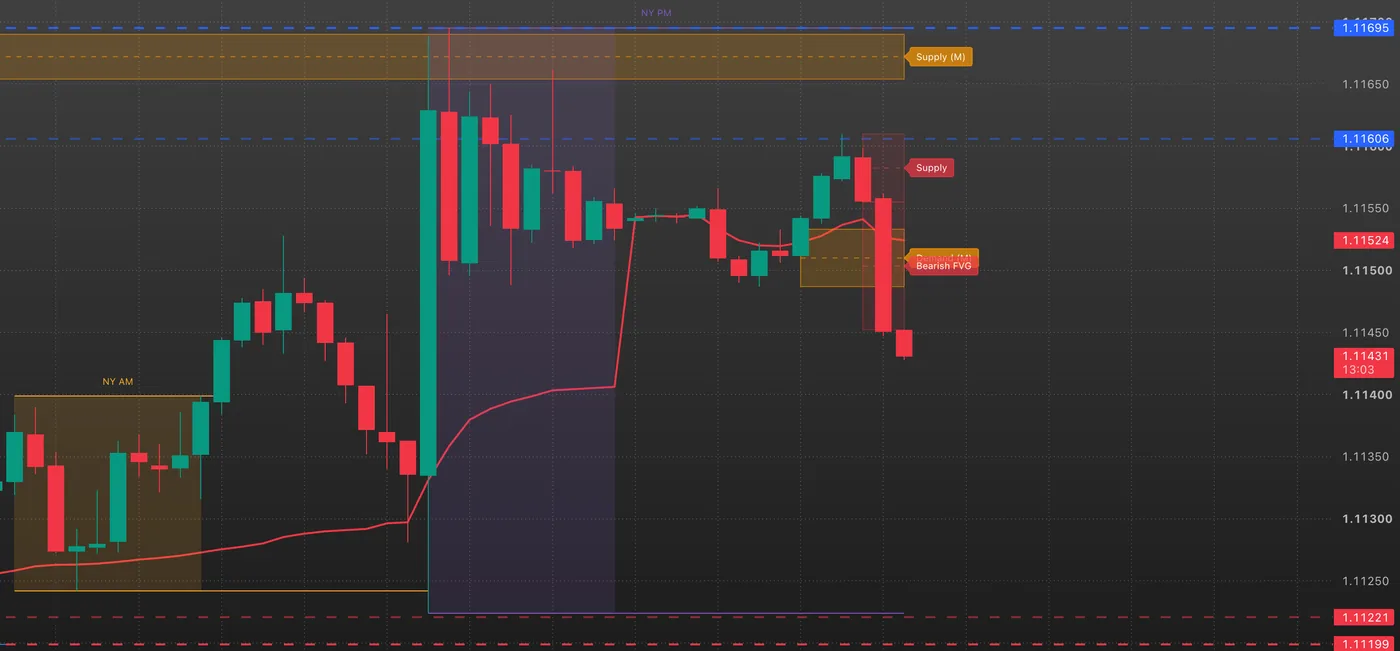
The dashed lines are the liquidity lines:
- HOD and LOD: the highest high and the lowest low of the London, New York AM and New York PM windows of the last finished trading day. Not the whole day, and not today’s high and low so far.
- Prev HOD and Prev LOD: the same levels from the trading day before, in a lighter colour.
They are taken from closed 30-minute candles and fixed for the whole trading day. The trading day follows the symbol’s daily candle (for forex it starts at 17:00 New York time). The Asia box never feeds them. The London and New York windows feed them even when their boxes are hidden, so changing a window changes the levels.
Why they matter
London and New York are the hours when banks and other institutional traders are most active, so they carry most of the day’s volume and the biggest moves. The high and low they leave behind are levels the whole market watches. Many traders put their stops and pending orders just beyond them, and those resting orders are liquidity: large players need them to fill big positions. That is why they are called liquidity lines, and why price often comes back to them, to sweep them or to react at them.
A line is not a signal on its own. It tells you where a reaction is more likely.
The VWAP
The red line is the VWAP, the volume-weighted average price since the start of the trading day. It restarts every trading day and moves with the current candle.
Fair value gaps
A fair value gap is a gap left by a strong candle, one whose body is larger than 1.5 times the average true range (the Impulse multiplier). Bullish gaps sit below price, bearish gaps above it, and a gap is removed as soon as price comes back to it. The video shows them on gold, 15 minutes, because EURUSD had no open gap that day.
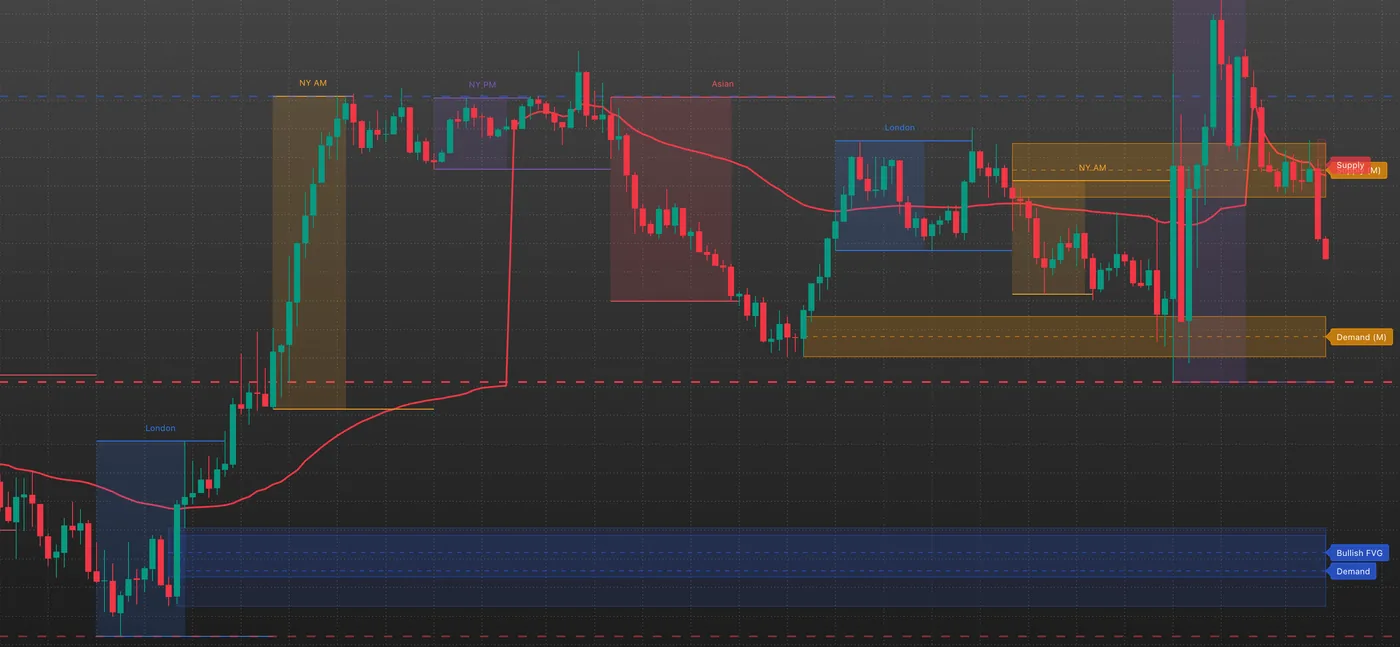
Supply and demand zones
Supply zones above price and demand zones below it come from swing highs and lows of the Detection timeframe (30 minutes by default), so they stay the same on every chart timeframe. Zones kept per side sets how many stay (5 by default). When price touches a zone, it is mitigated; the latest mitigated zone on each side stays on the chart, tagged Supply (M) or Demand (M).
How to use killzones and liquidity lines together
- Open a 15-minute chart of a forex major, gold or a US index, with standard candles.
- Decide the direction from your own trend analysis on a higher chart, for example with PipTrend V2.0. This indicator gives no direction.
- Wait for a killzone, ideally London or New York AM. Outside them, accept lower quality or skip.
- Wait for price to reach a level in your direction: a VWAP retest, a sweep of HOD, LOD, Prev HOD or Prev LOD, a fair value gap, or a supply or demand zone. Enter at the level, not at the first sight of the trend.
- Place the stop beyond the structure that defines the setup, keep the same risk on every trade, and set the target before you enter. If any of this is missing, there is no trade.
Alerts
All alerts are checked when a candle closes; create them with Once Per Bar Close.
- HOD Break, LOD Break, Prev HOD Break, Prev LOD Break: the close crosses an unchanged level.
- HOD Retest, LOD Retest, Prev HOD Retest, Prev LOD Retest: after a break, a candle closes within two ticks of that level.
- Supply Mitigated, Demand Mitigated, Bullish FVG Mitigated, Bearish FVG Mitigated: a zone or gap was touched.
The HOD and LOD alerts fire only on 1, 2, 3, 5, 6, 10, 15 or 30 minute charts with standard candles. To get them while you watch an hour chart, create them from a 15 or 30 minute chart of the same symbol: an alert keeps the timeframe it was made on. Every condition is explained in PipTrend alerts: every alert condition explained.
What is fixed and what moves
- Fixed for the day: the HOD, LOD, Prev HOD and Prev LOD lines (on 1 to 30 minute charts with standard candles).
- Live until the candle closes: the killzone boxes and their lines, the VWAP, a forming fair value gap, and the supply and demand zones, which are detected on the forming candle of the detection timeframe.
If it doesn’t work
- No boxes and no VWAP: your chart is above 15 minutes. Switch to 15m or lower, or raise Show on timeframes up to (minutes).
- The HOD and LOD lines don’t match yesterday’s high and low: that is by design. They come from the London and New York windows only.
- A HOD or LOD alert never fires: it only fires on 1 to 30 minute charts with standard candles. Re-create it from a 15 or 30 minute chart.
- Old boxes disappear on the left: TradingView keeps at most 100 boxes, 100 lines and 100 labels per script, so the oldest drawings go first.
- No fair value gap on the chart: there may be none open. A gap is removed as soon as price comes back to it.
FAQ
What are the killzones in PipTrend Session Liquidity?
The active hours of each session: Asia 09:00 to 13:00 Singapore time, London 08:00 to 11:00 London time, New York AM 09:30 to 12:00 and New York PM 14:30 to 17:00 New York time. Each follows its market’s daylight saving.
What do HOD and LOD mean in PipTrend Session Liquidity?
The high and low of the London and New York windows of the last finished trading day. Prev HOD and Prev LOD are the same from the day before. They are not the whole day’s high and low.
Why are they called liquidity lines?
Stops and pending orders collect just beyond the high and low of the most active sessions. Those resting orders are liquidity, and price often comes back to these lines to sweep them or react at them.
Does PipTrend Session Liquidity give buy or sell signals?
No. It shows when and where price tends to react. Decide the direction first, for example with PipTrend V2.0, then use the killzones and levels to time your entry.
Why don’t the killzone boxes show on my chart?
Your chart is above 15 minutes. The boxes and the VWAP show on charts up to 15 minutes by default: switch to 15m or lower, or raise Show on timeframes up to (minutes) in the indicator’s settings.
Which markets and timeframes is Session Liquidity built for?
Intraday charts of 1 to 30 minutes on forex majors, gold and US indices.
Transcript
Full transcript
PipTrend Session Liquidity is a key levels indicator. It doesn’t draw candles, and it doesn’t tell you to buy or sell. It marks when and where intraday price tends to react: the killzones, the day’s VWAP, the high and low of the previous days’ active sessions, fair value gaps, and supply and demand zones.
Open Indicators, go to Invite-only scripts, and click PipTrend Session Liquidity. On the chart, it shows as PipTrend Liquidity. It’s built for intraday charts, so switch to 15 minutes: the boxes and the VWAP show on charts up to 15 minutes by default.
The boxes are the killzones, the active hours of each session. Asia runs from 9 to 1, Singapore time. London from 8 to 11, London time. New York AM from 9:30 to 12, and New York PM from 2:30 to 5, New York time. Each window follows its own market’s clock, including daylight saving, so you never have to retype them.
In the settings, under Killzones, you can change each window, its colour, or hide a box. Session high and low lines mark each box’s high and low until price breaks them. And Show on timeframes up to sets the highest chart timeframe for the boxes and the VWAP.
The dashed lines are the liquidity lines. HOD and LOD are the high and the low of the London and New York windows of the last finished trading day. Not the whole day, and not today’s high and low so far. Prev HOD and Prev LOD are the same levels from the day before, in a lighter colour. They’re fixed for the whole trading day, and the Asia box never feeds them.
Why these windows? London and New York are the hours when banks and other institutional traders are most active, so they carry most of the day’s volume and the biggest moves. The high and low they leave behind are levels the whole market watches. Many traders put their stops and pending orders just beyond them, and those resting orders are liquidity: large players need them to fill big positions. That’s why we call them liquidity lines, and why price often comes back to them, to sweep them or to react at them. A line is not a signal on its own, but it tells you where a reaction is more likely.
The red line is the VWAP, the volume-weighted average price since the start of the trading day. It restarts every day, and it moves with the current candle.
A fair value gap is a gap left by a strong candle, one whose body is bigger than one and a half times the average true range. Bullish gaps sit below price, bearish gaps above it, and a gap is removed when price comes back to it.
Supply zones above price and demand zones below it come from swing highs and lows on the 30 minute chart, so they stay the same on every chart timeframe. When price touches a zone, it’s mitigated. The latest mitigated zone on each side stays on the chart, marked with an M.
Here’s how to use it. First, decide the direction from your own trend analysis on a higher chart, for example with PipTrend V2.0. This indicator doesn’t give you one. Then wait for a killzone, ideally London or New York AM. Then wait for price to reach a level in your direction: a VWAP retest, a sweep of a HOD or LOD line, a fair value gap, or a zone. Enter at the level, not at the first sight of the trend.
Place your stop beyond the structure that defines the setup, keep the same risk on every trade, and set your target before you enter. If any of that is missing, there’s no trade.
It has alerts for HOD and LOD breaks and retests, and for zones and gaps being mitigated. They’re checked when a candle closes. The level alerts only fire on charts of 30 minutes or less, so create them from a 15 or 30 minute chart. Every alert is explained in our PipTrend alerts video.
Next, see PipTrend Zones: support and resistance zones with touch counts.
Related guides
- PipTrend Zones guide
- Build your PipTrend chart: one indicator per family
- PipTrend alerts: every alert condition explained
Risk Disclaimer: Trading involves risk. Past performance doesn't guarantee future results. Only trade with money you can afford to lose. PipTrend is a tool to assist your trading decisions, not financial advice.
Finished this guide?
Was this guide helpful?